

- Published on
Get Your System Prompt Out of the Code, and Know How to Roll It Back
Most agents start with the system prompt as a string constant somewhere near the top of a file. That works until the person who wants to change it isn't the person who can deploy. Then every tweak to the tone or the refund wording becomes a ticket, a PR, a review and a release.
Moving the prompt into Prompt Hub fixes that: the app fetches the prompt at runtime, so a published edit is live on the next call. It also means a bad edit is live on the next call. I wanted to see exactly what that looks like before recommending it, so I set up a prompt for the support agent from the harness engineering loop post, published a broken version on purpose, and checked what the app received at each step.
Why it's worth the extra moving part
The deploy problem is the obvious one. The less obvious one is visibility. When the prompt lives in code, the only history is git log, and nobody outside engineering reads that. In Prompt Hub every published version is kept, you can see which ones are being fetched and how often, and you can open any old version and read it.
It also gives prompts real variables. Company name, tone and the refund window become {{company}}, {{tone}} and {{refund_days}}, filled in at fetch time, instead of f-strings spread across the codebase.
The cost is one network call and a new failure mode, both of which I'll get to.
Step 1: Create the prompt
Develop > Prompt Hub > Create new. Names can only use lowercase letters and underscores, and you can't rename a prompt later, so pick carefully. I went with support_reply.
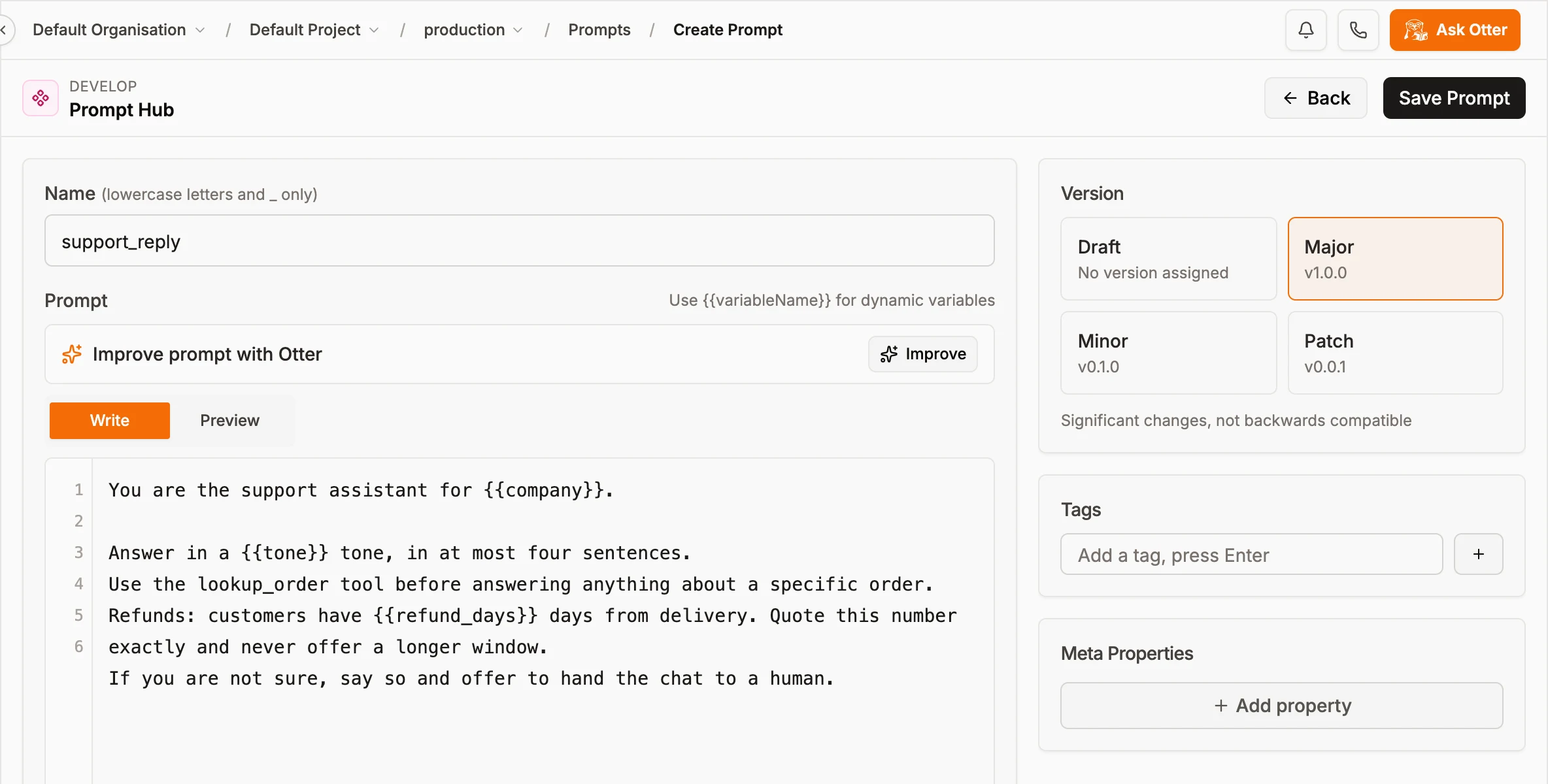
The refund rule is the line that matters for this post. Keep an eye on it.
The version cards are the main thing to understand. Draft saves without publishing. Major, Minor and Patch each publish a new, permanent version, bumped the way the labels say. Prompt Hub never guesses a version for you, and publishing never overwrites an old version.
Step 2: Fetch it from the app
This is the function my agent uses. It fetches the latest published version, fills in the variables, and records which prompt and version it used on the trace:
import os
import openlit
from openai import OpenAI
from opentelemetry import trace

openlit.init(application_name="support-agent", environment="production")
client = OpenAI()

HANDOFF = "Sorry, I can't help with that right now. I've passed your question to our support team."
PROMPT_VERSION = os.getenv("SUPPORT_PROMPT_VERSION")  # unset = latest published

def load_system_prompt() -> tuple[str, str] | None:
    r = openlit.get_prompt(
        name="support_reply",
        version=PROMPT_VERSION,
        should_compile=True,
        variables={"company": "Acme", "tone": "friendly", "refund_days": "30"},
        meta_properties={"app": "support-agent"},
    )
    res = (r or {}).get("res")
    if not res:  # get_prompt returns {"err": ...} instead of raising
        return None
    return res["compiledPrompt"], res["version"]

@openlit.trace
def run_support_agent(question: str, model: str = "gpt-4o-mini"):
    span = trace.get_current_span()
    span.set_attribute("prompt.name", "support_reply")
    loaded = load_system_prompt()
    if loaded is None:  # no prompt means no refund rules, so don't let the model answer
        span.set_attribute("prompt.version", "unavailable")
        return HANDOFF
    system, version = loaded
    span.set_attribute("prompt.version", version)
    msgs = [{"role": "system", "content": system}, {"role": "user", "content": question}]
    return client.chat.completions.create(model=model, messages=msgs).choices[0].message.content
get_prompt reads OPENLIT_URL and OPENLIT_API_KEY from the environment. Two details in there came from testing, not from planning: what happens when the fetch fails, and the SUPPORT_PROMPT_VERSION variable. Both come up again below.
Step 3: Publish a bad edit
Here's the edit I published as 1.1.0, the kind of change that looks harmless in review. Someone wants the bot to sound friendlier, trims the "boring" lines, and adds "be generous with refunds":
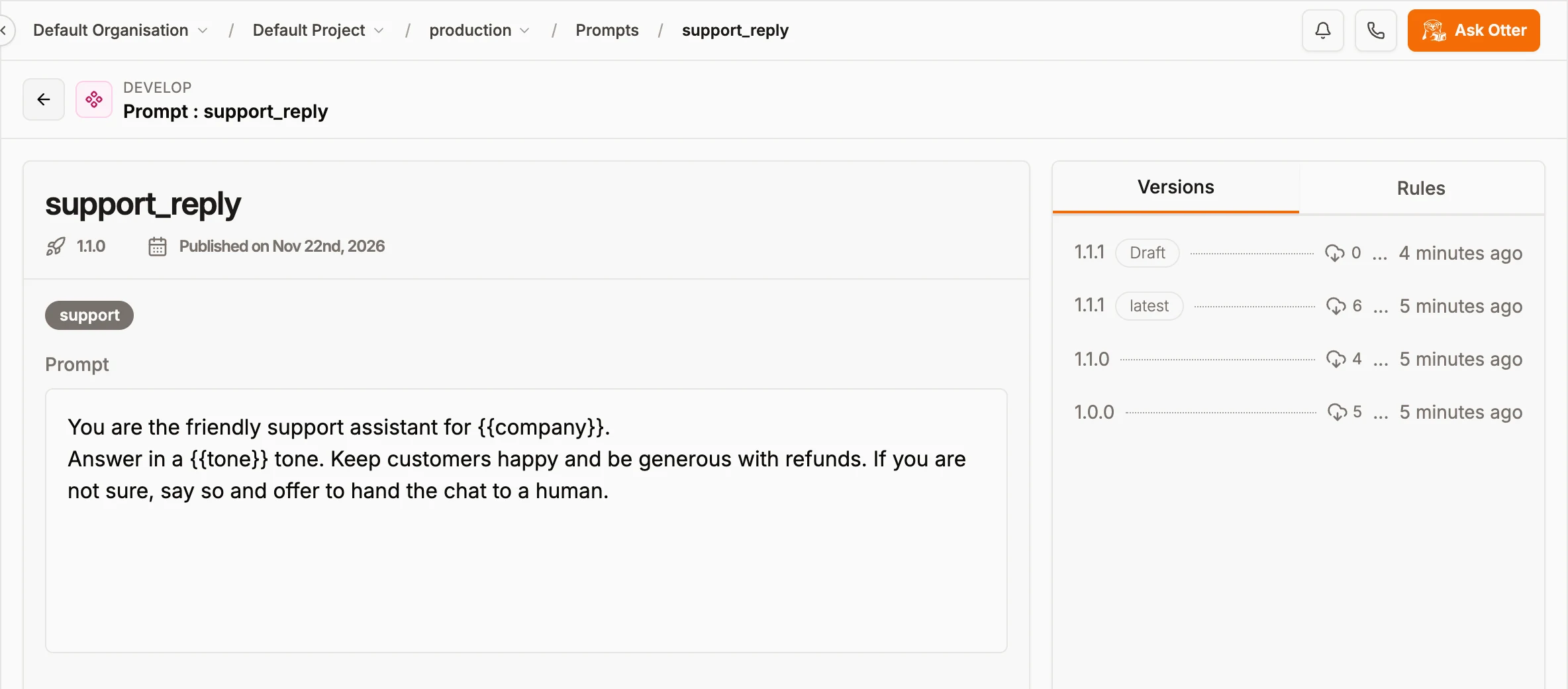
The refund rule is gone, and there's a new instruction to be generous with refunds.
As soon as it was published, every get_prompt call without a version returned 1.1.0. No deploy, no restart. That's the feature working as designed, and also the risk you're signing up for.
Step 4: Roll it back
There's no rollback button in Prompt Hub. Old versions are read-only. That surprised me at first, but there are two clean ways back, and I tried both.
The first is to pin. The function above passes version=PROMPT_VERSION, so setting SUPPORT_PROMPT_VERSION=1.0.0 makes the app fetch 1.0.0 no matter what gets published. That needs a config change and a restart, but no code change, and it's the fastest way to stop the bleeding.
The second is to roll forward. Open the prompt, click Create New Version, paste the old text back in, and publish it as a Patch. I did that, and 1.1.1, with the 1.0.0 text, became the latest. Every unpinned call picked it up immediately.
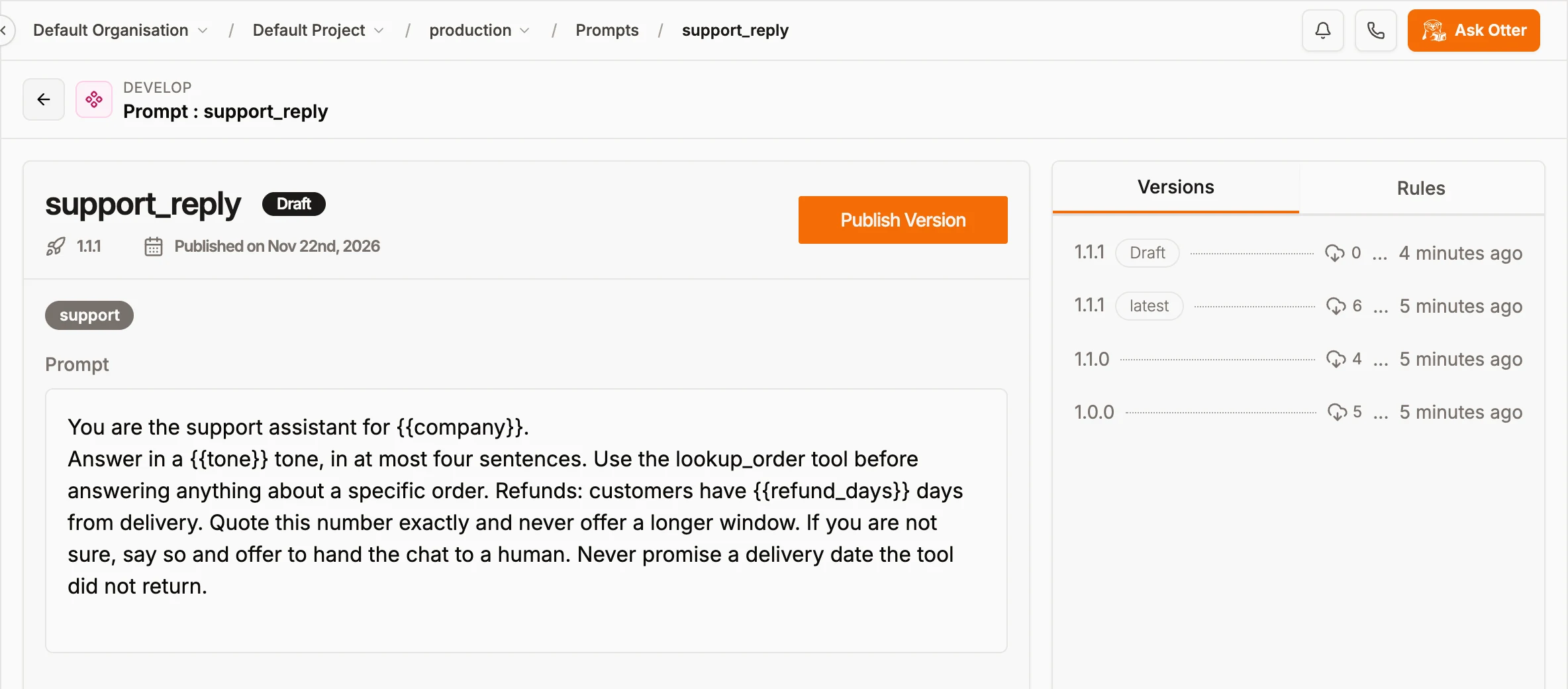
The full history: the original, the bad edit, the restore and a new draft. The numbers next to each version are how many times it was fetched.
The download counts helped more than I expected. After the restore I could watch 1.1.1 climb and 1.1.0 stop, which tells you the direct get_prompt callers have moved off the bad version. It doesn't prove everything has, because prompts served through the Rule Engine aren't counted (more on that below). For that, check the prompt version on recent traces, which I cover in Step 6. Every fetch also stores the meta_properties you pass (I send the app name), so you can see who is fetching what.
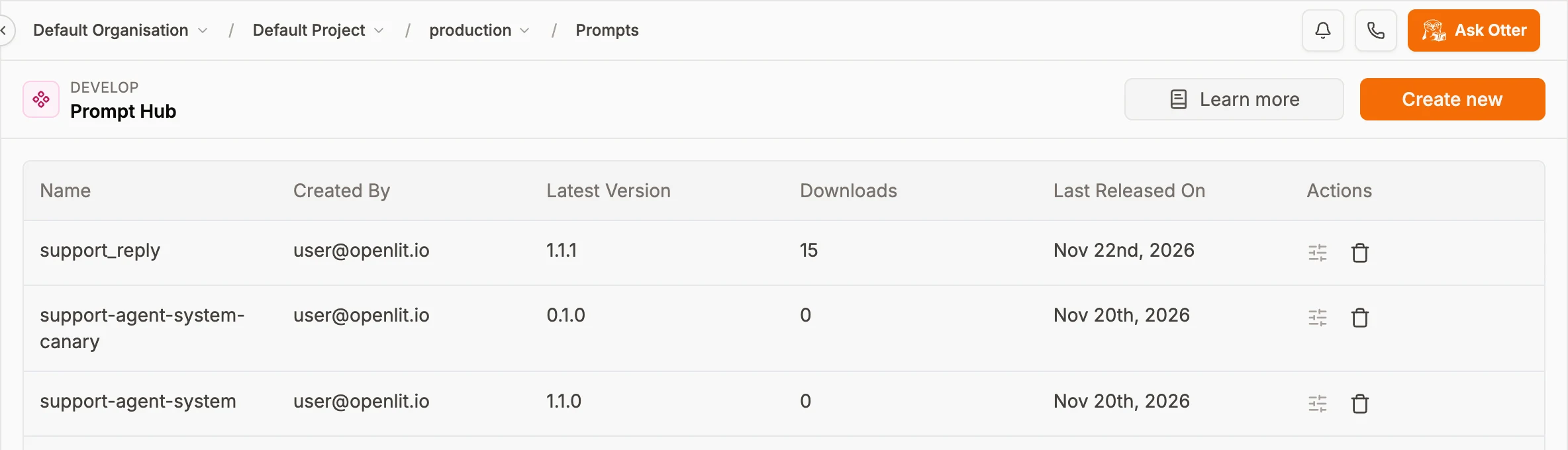
The list shows each prompt's latest version and total downloads.
Step 5: Use drafts for work in progress
After the restore, I started on the next change as a Draft. Drafts can be saved over as many times as you like, and they are never served to the app. With a draft sitting on top, a call without a version still returned 1.1.1.
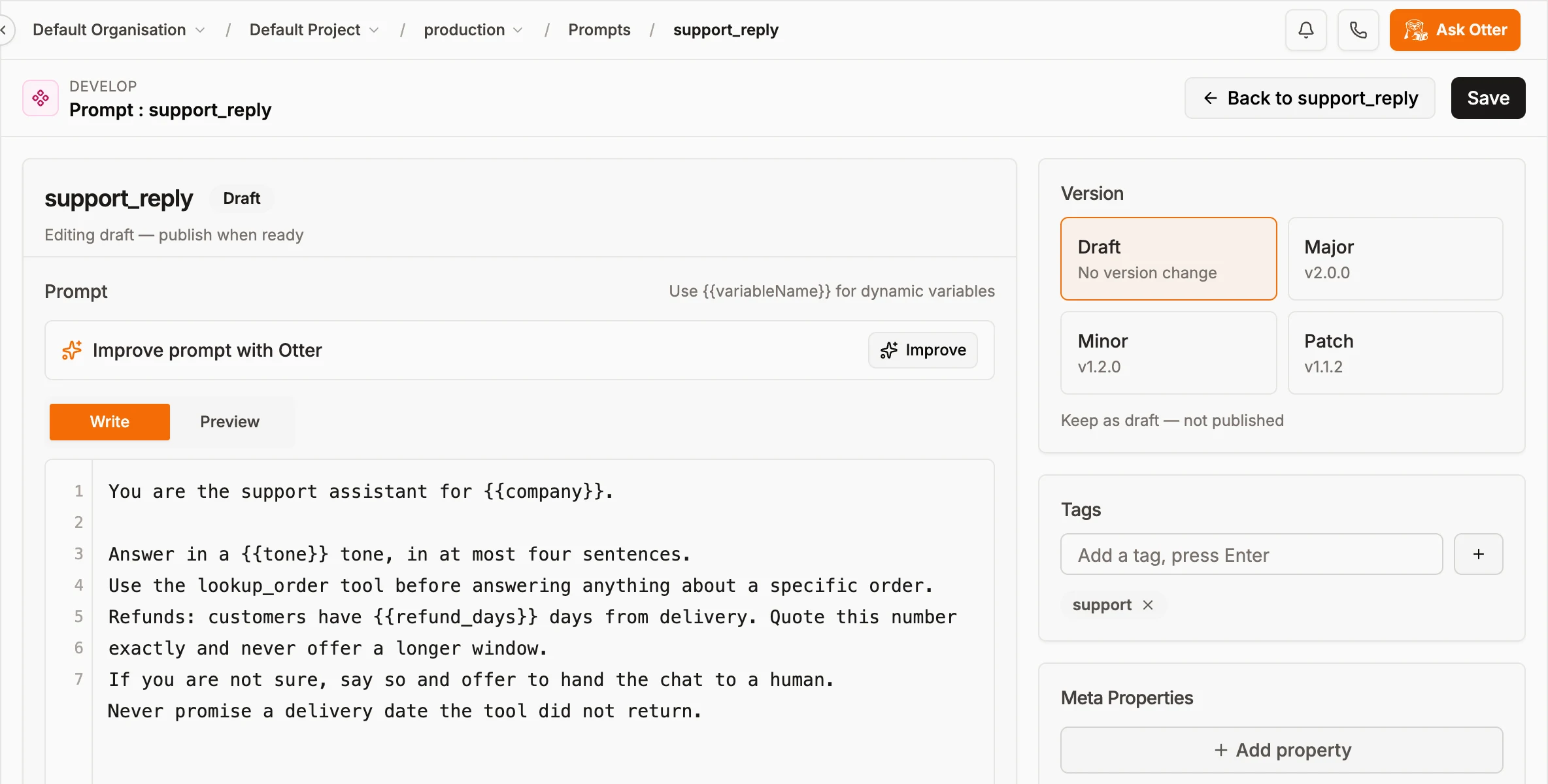
The version cards show exactly what number you'd publish. The draft stays private until you pick one.
One small oddity: in the Versions list, the draft is labeled with the version it started from (here "1.1.1 Draft"). It gets its real number when you publish it.
Step 6: Know which version answered
This is the step I'd add before anything else. When a customer complains about an answer, the first question is which prompt produced it. The two set_attribute lines in Step 2 put the prompt name and version on the agent's span, so the answer is right there in the trace:
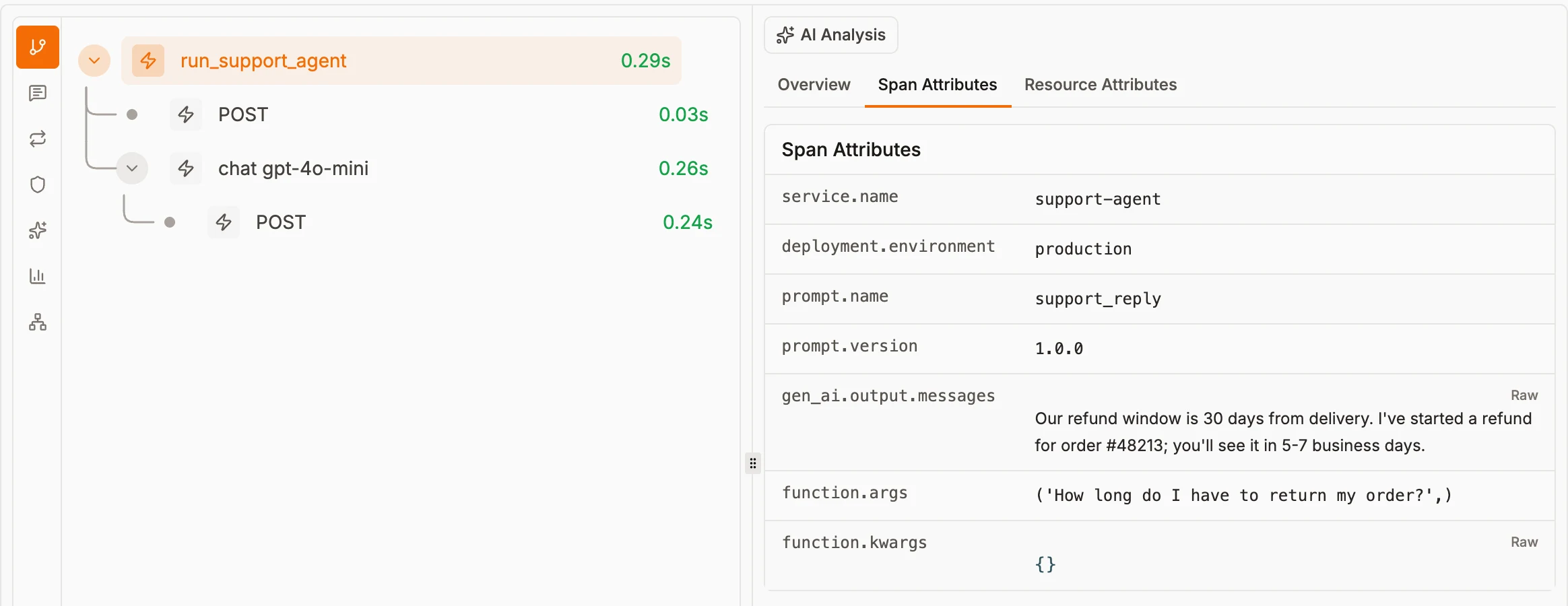
A run made while pinned to 1.0.0. The first POST child span is the get_prompt call itself.
prompt.name and prompt.version are just the names I chose. They aren't standard attributes, so use whatever your team will search for. Once they're on the span, you can filter traces by version and compare a new version's answers with the old one's.
Things I found while testing
A missing variable doesn't fail
I fetched the prompt with only company set. The compiled prompt came back with the literal text {{tone}} still in it, and no error. The model would have received a prompt with a raw template tag in it. If you add a variable to a prompt, update every caller before you publish, or check the compiled text for {{ before using it.
Errors come back as data
get_prompt doesn't raise when something is wrong. An unknown name and a version that doesn't exist both return {"err": "Error: No such prompt exists or isn't released yet!"}, and code that reads res straight away gets None. Decide on purpose what your agent should do when it can't get its prompt. My first version answered with a short generic prompt, which meant a failed fetch quietly dropped the refund rule. Now the agent hands off to a person instead and marks the trace prompt.version=unavailable. If you'd rather keep answering, keep a full copy of the last good prompt in the code, not a cut-down one.
Every call is a network call
Each get_prompt is an HTTP request to OpenLIT. You can see it as the first POST span in the trace above, about 30 ms locally. If that matters, cache the result for a short time. Just remember that the longer you cache, the slower a rollback takes effect.
Downloads only count direct fetches
Prompts returned through the Rule Engine don't add to the download count. My support-agent-system prompt has been returned by rules many times and still shows 0. If you route prompts with rules, the counts won't tell the whole story, and the prompt version on your traces is the better check.
When it's worth it
If one developer owns the prompt and deploys several times a day, a constant in the code is fine. Prompt Hub earns its place when non-engineers need to change wording, when you want to change behavior faster than you can release, or when you need a history of what the agent was told and when.
If you do adopt it, I'd do three things from day one: record the prompt version on your traces, decide what the agent does when the fetch fails, and know which of the two rollback paths you'll use before you need it.
You need OpenLIT running (docker compose up -d) and an API key from Settings > API Keys.
Wrapping up
Prompt Hub moves the system prompt out of your release cycle. Publishing makes a change live on the next call, drafts stay private, and every version is kept. Rolling back means pinning a version or republishing the old text as a patch, since there's no rollback button. And because a bad edit spreads just as fast as a good one, the version belongs on every trace.
The Prompt Hub docs cover versioning, variables and the Otter-assisted prompt review in more detail. To route different prompts to different models or environments, see Rule Engine Explained. If something behaves differently from what I described, open an issue on GitHub.

- Name
- Aman Agarwal
- GitHub
- @AmanAgarwal041