

- Published on
The Harness Engineering Loop, End to End: Observe, Evaluate, Guard, Fix, Verify

Picture a support agent telling a customer they have 60 days to return an order. The policy says 30. Nothing crashed, latency was normal, and every request came back 200 OK. The agent was just wrong, confidently, and you'd only find out when the customer forwards the chat to someone who knows the policy.
That's the scenario I built for this post, and it's a pretty typical way agents fail. It isn't an exception you can catch. Waiting for a better model won't fix it either. The fix lives in the harness: the context, prompts, tools, keys and guardrails you put around the model.
Agent harness engineering is the habit of improving that harness deliberately, in a loop. I think of it as five steps:
Observe what the agent actually did.
Evaluate whether the answer was right.
Guard against inputs and outputs you never want.
Fix the harness (context, prompt, routing, keys) without redeploying.
Verify the fix, before and after you ship.
Below I go through the whole loop with OpenLIT on one small support agent. Every screenshot is from a local OpenLIT instance I ran for this post, and everything here works on the free, self-hosted, Apache-2.0 version.
Why a loop and not a dashboard
Agent problems tend to show up a month or two into production, and they look roughly the same everywhere.
Your APM says everything is healthy, because from its point of view it is. HTTP calls succeeded. It has no idea the refund window was made up.
The fix is usually a sentence in a system prompt or a paragraph of policy, but it ships like any other code change. That means review, CI and a deploy, for one line of text.
The same policy also ends up copied into the system prompt, the eval rubric, a RAG chunk and somebody's wiki page. Those copies drift.
And without a score on production traces and a check in CI, "we fixed it" really means "we haven't seen it again yet."
What makes this a loop rather than five separate tools is that the steps share data. The trace attributes behind your dashboards are also what decide which context, prompt and evaluator apply to a request. Change one thing in OpenLIT and both the agent's behavior and the way it's graded move with it.
Walking through it
The agent is a small support-agent service: an OpenAI-compatible chat model, one lookup_order tool, and a refund policy. You'll need Docker and Python 3.9 or newer.
Step 0: Start OpenLIT
git clone https://github.com/openlit/openlit.git
cd openlit
docker compose up -d
The UI runs on http://127.0.0.1:3000 (default login [email protected] / openlituser). The OTLP receiver listens on 4318 for HTTP and 4317 for gRPC. Create an API key under Settings > API Keys, since the Rule Engine, Prompt Hub, Vault and offline evals all need one.
pip install openlit openai
export OPENLIT_URL="http://127.0.0.1:3000"
export OPENLIT_API_KEY="openlit-..."   # from Settings > API Keys
Step 1: Observe every step the agent takes
openlit.init() instruments the OpenAI client for you. Adding @openlit.trace to the agent's entry point groups each run's LLM calls and tool round-trips under one parent span.
import json
import openlit
from openai import OpenAI

openlit.init(
    otlp_endpoint="http://127.0.0.1:4318",
    application_name="support-agent",
    environment="production",
    custom_span_attributes={"team": "support"},
)

client = OpenAI()

@openlit.trace
def run_support_agent(question: str, model: str = "gpt-4o-mini"):
    messages = [
        {"role": "system", "content": SYSTEM_PROMPT},
        {"role": "user", "content": question},
    ]
    first = client.chat.completions.create(model=model, messages=messages, tools=TOOLS)
    msg = first.choices[0].message
    if msg.tool_calls:
        messages.append(msg)
        for call in msg.tool_calls:
            messages.append({
                "role": "tool",
                "tool_call_id": call.id,
                "content": json.dumps(lookup_order(**json.loads(call.function.arguments))),
            })
        return client.chat.completions.create(model=model, messages=messages).choices[0].message.content
    return msg.content
That's all the instrumentation there is. You don't write spans by hand or wrap create(). Every request shows up under Monitor > Telemetry with service name, environment, model, tokens and cost already attached as OpenTelemetry GenAI attributes.
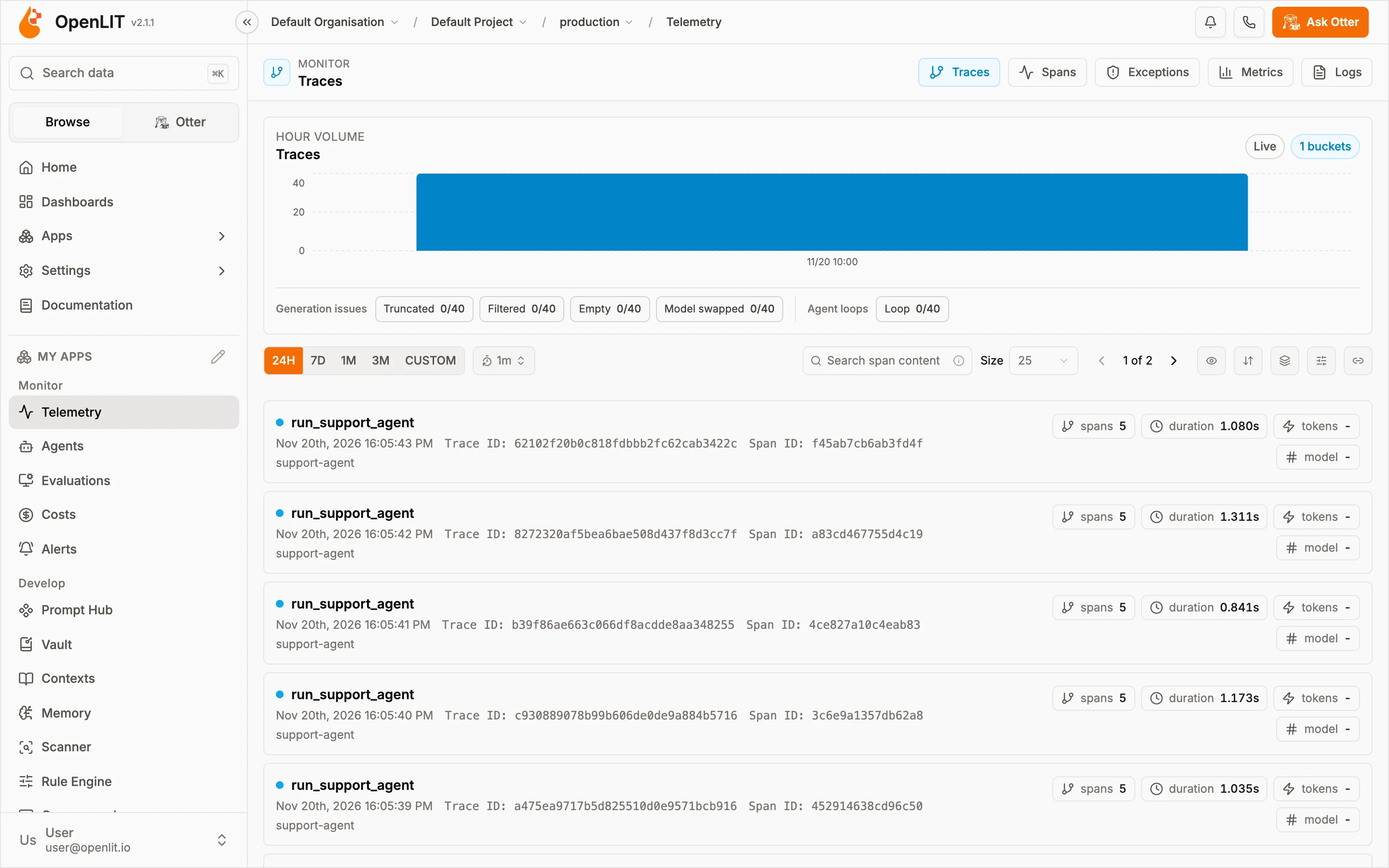
Each run_support_agent row is one run of the agent: five spans, about a second, all from support-agent.
Click into a trace and you get the whole tree: the agent span, the first chat gpt-4o call that decided to use the tool, and the second one that wrote the answer.
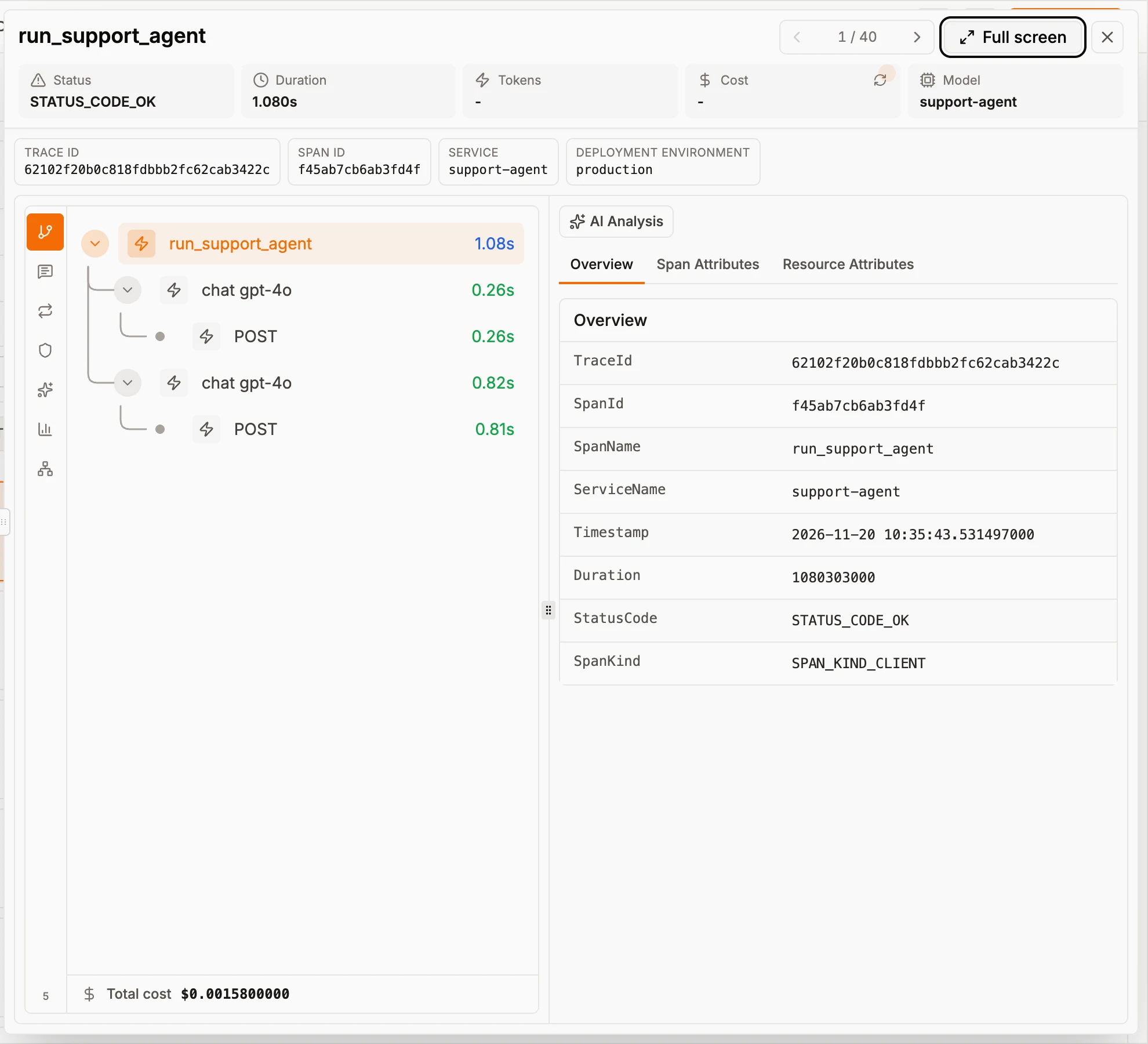
0.26 s deciding to call the tool, 0.82 s writing the answer, and the cost of the run.
These are plain OTLP spans, so you can send the same data to Grafana, Datadog or whatever you already run. There's no special agent runtime or trace format to adopt.
Step 2: Evaluate whether the answer was right
Traces show you what happened. They don't tell you if it was correct, and that's what evaluations are for. Under Monitor > Evaluations > Evaluators, turn on the built-in LLM-as-a-judge types you care about. For a support agent I'd start with Hallucination, Toxicity and Bias.
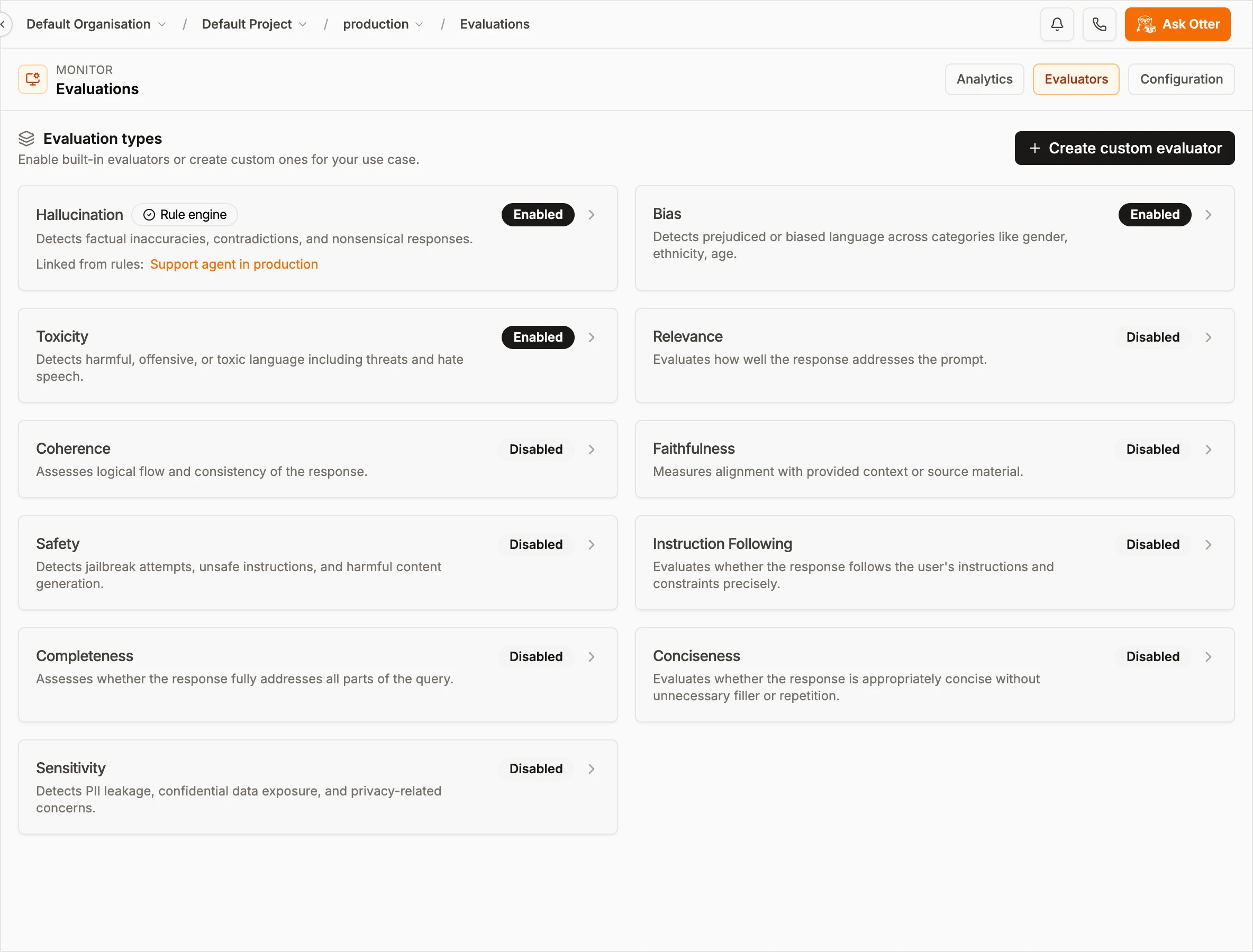
Hallucination is on, and it's linked to a Rule Engine rule. I'll get to that in Step 4.
Pick the judge model on the Configuration tab. Its provider key comes from Vault instead of an environment variable. Auto Evaluation runs your enabled evaluators against new traces on a schedule, at whatever sample rate you set.
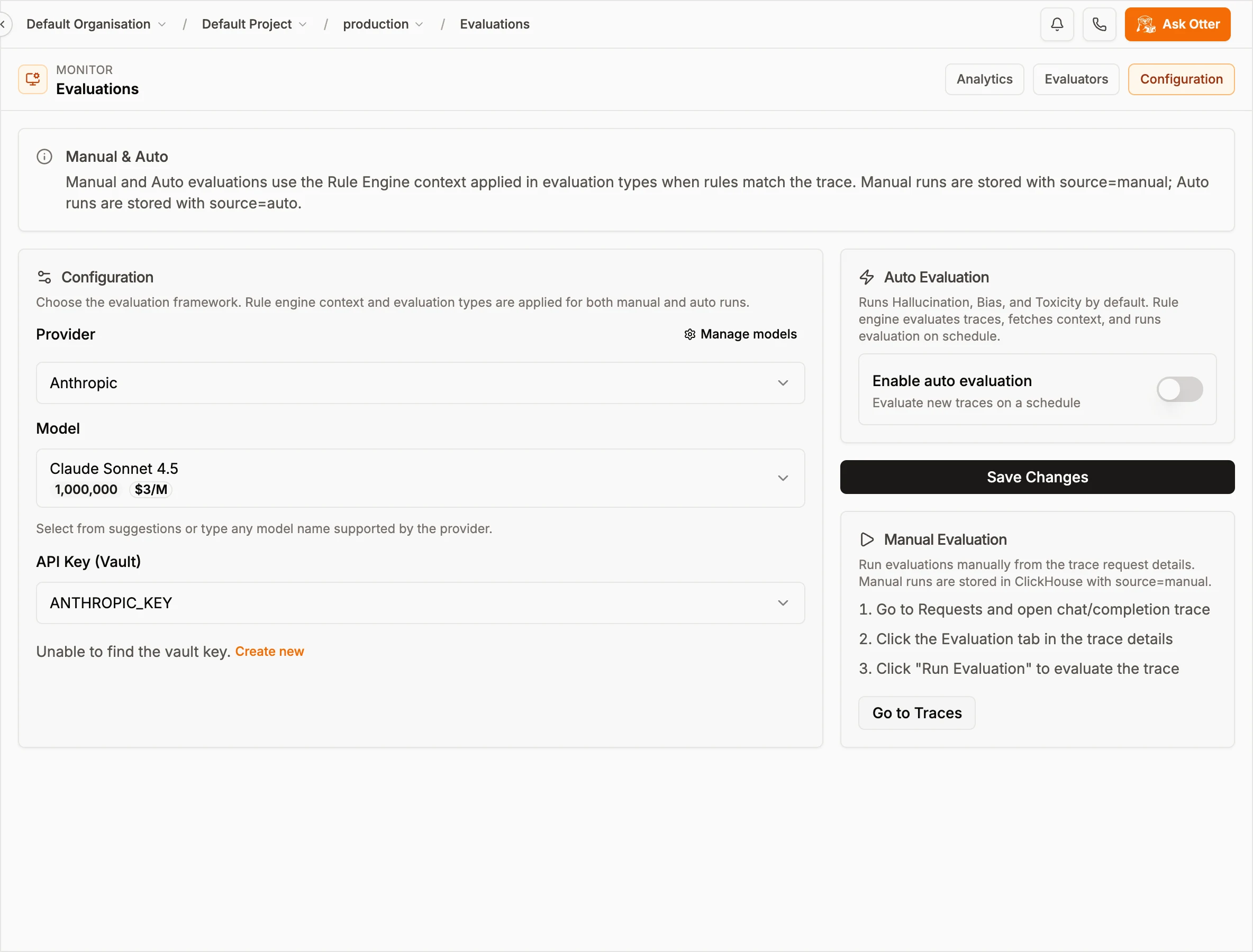
The judge model, its key from Vault, and the Auto Evaluation switch.
Pass rates, cost per evaluation and the failing traces land in the Analytics tab. "The agent hallucinates sometimes" turns into a number you can watch.
Step 3: Guard the inputs
Evaluations grade answers after they happen. Guardrails run before the call. The SDK's openlit.guard module has PromptInjection, PII, SensitiveTopic, TopicRestriction, Moderation, Schema and Custom, and most of them can run either with an LLM or with regex only:
import openlit

# LLM-based detection
injection_guard = openlit.guard.PromptInjection(provider="openai")

# Or regex-only, with no extra LLM call
fast_guard = openlit.guard.PromptInjection(
    custom_rules=[{"pattern": r"assume the role", "classification": "impersonation"}]
)

result = injection_guard.detect(text=user_message)
What I'd do: run the regex guard on every request, since it doesn't make a model call, and save the LLM guard for risky paths like anything that can trigger the refund tool. Call detect() on the user's message before it reaches the agent, and refuse or hand off when it's flagged. The guardrails docs list the options for each guard.
Step 4: Fix the harness without a deploy
Back to the 60-day answer. Fixing it properly takes three things. The agent needs the actual policy. The system prompt needs to tell it to quote that policy rather than improvise. And the hallucination judge has to grade against the same policy.
In code, that's three edits and a deploy. In OpenLIT, it's one rule.
4a. Store the policy once, as a Context
Develop > Contexts is where you keep named, versioned markdown: policies, reference snippets, bits of system prompt. I created one called Refund Policy:
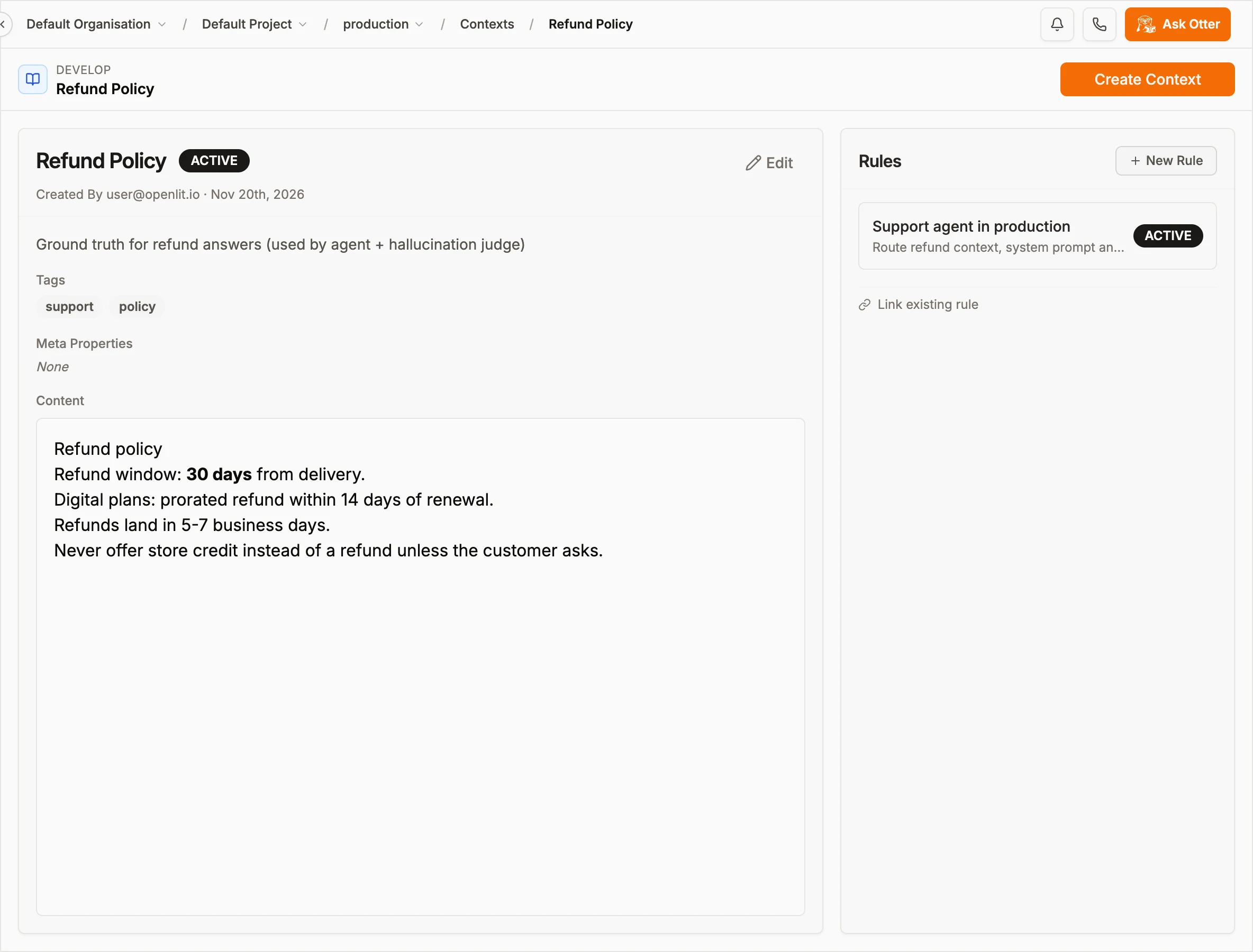
The refund window lives here and nowhere else. The Rules panel shows which rule returns it.
4b. Version the system prompt in Prompt Hub
In Prompt Hub I created support-agent-system with {{company}} and {{refund_days}} variables, then published the stricter instructions as 1.1.0. If it goes wrong, 1.0.0 is still there to roll back to.
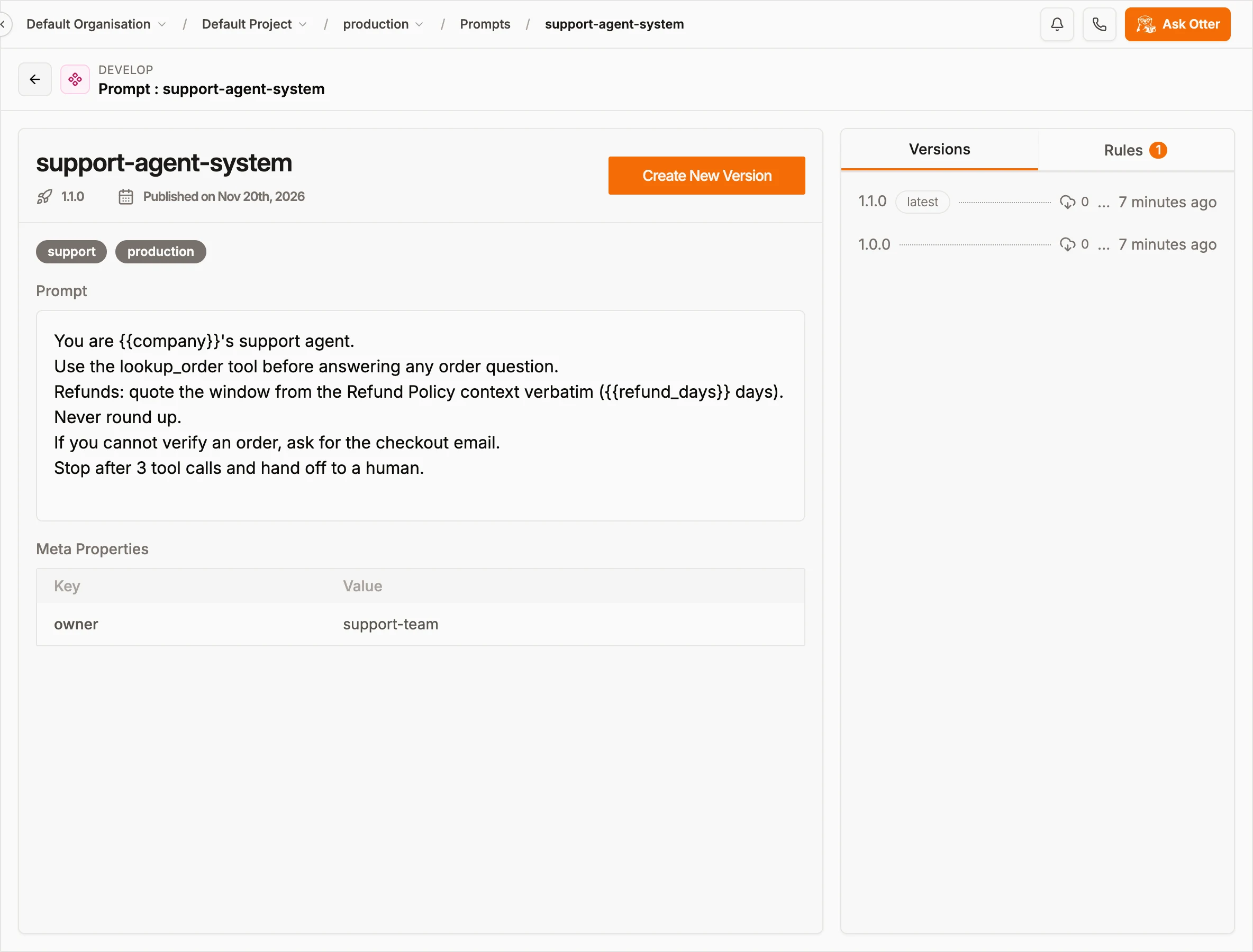
Prompt versions don't depend on app deploys. 1.1.0 adds "quote the window verbatim" and a limit of three tool calls.
4c. Route both with the Rule Engine
The Rule Engine is what connects all of this. A rule is a set of conditions on trace fields (Service Name, Deployment Env, Model, cost, tokens and so on), plus the things it should return when those conditions match: a Context, a Prompt or an Evaluation type.
My rule, Support agent in production, matches when the service is support-agent, the environment is production, and the model is gpt-4o-mini or gpt-4o. It returns the Refund Policy context, the support-agent-system prompt and the Hallucination evaluator. Run Preview tries it against the last 100 traces so you can check it before anything depends on it:
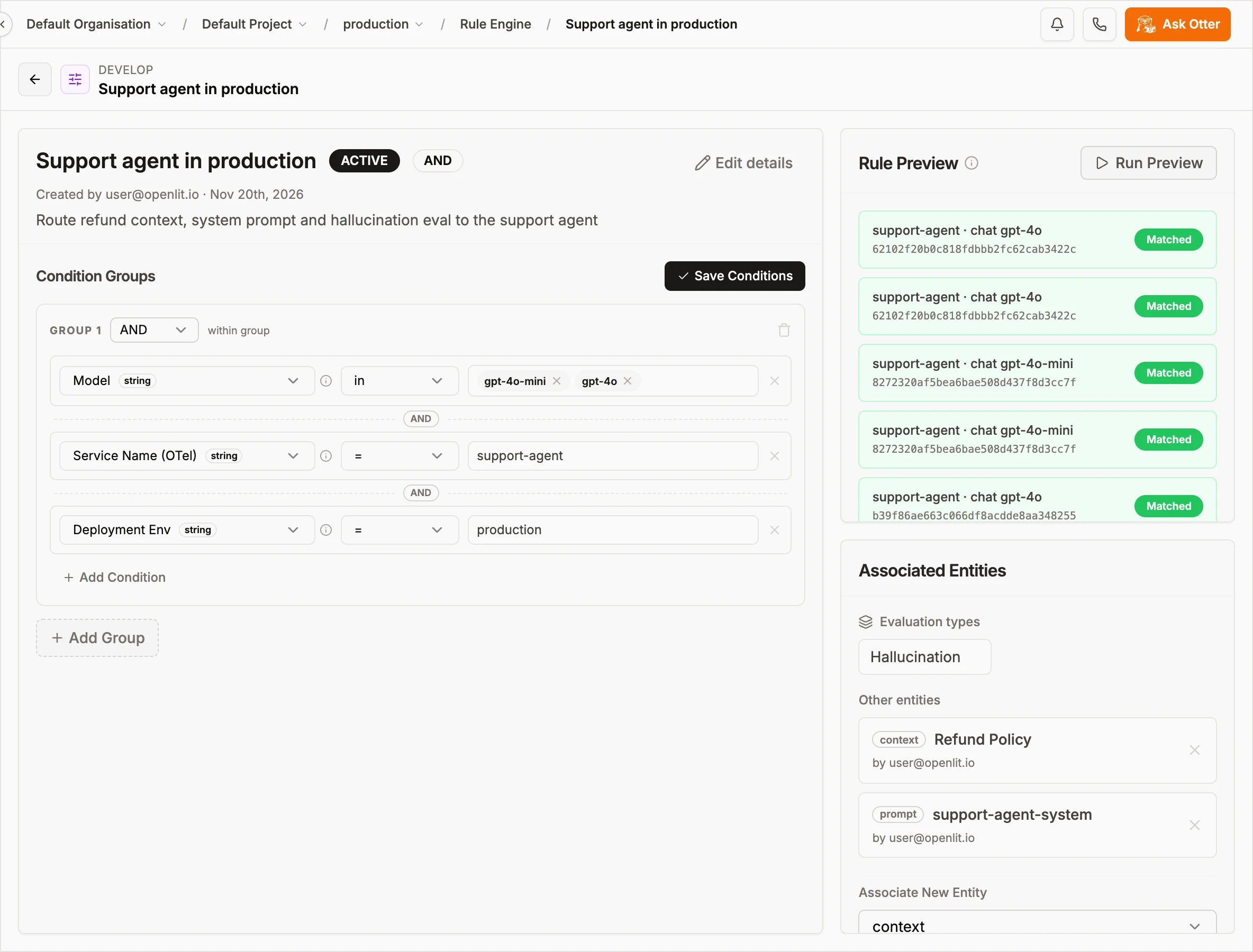
One rule, three linked entities, and a preview confirming it matches the agent's real traces.
Now the app asks OpenLIT what applies instead of hardcoding it:
import openlit

fields = {
    "service.name": "support-agent",
    "deployment.environment": "production",
    "gen_ai.request.model": "gpt-4o-mini",
}

ctx = openlit.evaluate_rule(entity_type="context", fields=fields, include_entity_data=True)
prompt = openlit.evaluate_rule(
    entity_type="prompt",
    fields=fields,
    include_entity_data=True,
    entity_inputs={"variables": {"company": "Acme", "refund_days": "30"}, "shouldCompile": True},
)
Against my local instance, the context call came back with the matching rule and the full policy:
{
  "matchingRuleIds": ["410c6dfa-baac-4432-b9f1-d7a97b72de7d"],
  "entities": [{ "entity_type": "context", "entity_id": "e48b3d14-..." }],
  "entity_data": {
    "context:e48b3d14-...": {
      "name": "Refund Policy",
      "content": "# Refund policy\n\n- Refund window: **30 days** from delivery.\n- ...",
      "status": "ACTIVE"
    }
  }
}
The prompt call returns 1.1.0 with {{company}} and {{refund_days}} filled in, and asking for entity_type="evaluation" returns hallucination. The judge gets the same Context as ground truth, so if the context says 30 days and the model says 60, that trace fails.
Say the policy moves to 45 days next quarter. You edit the Context, and the agent and its grader both pick up the change. No deploy.
4d. Keep keys out of the code with Vault
That leaves credentials. Vault stores provider keys encrypted with AES-256-GCM, and apps fetch them by key or tag when they start:
import openlit

openlit.get_secrets(tags=["support-agent"], should_set_env=True)
# OPENAI_API_KEY is now in os.environ. Nothing lives in .env or the image.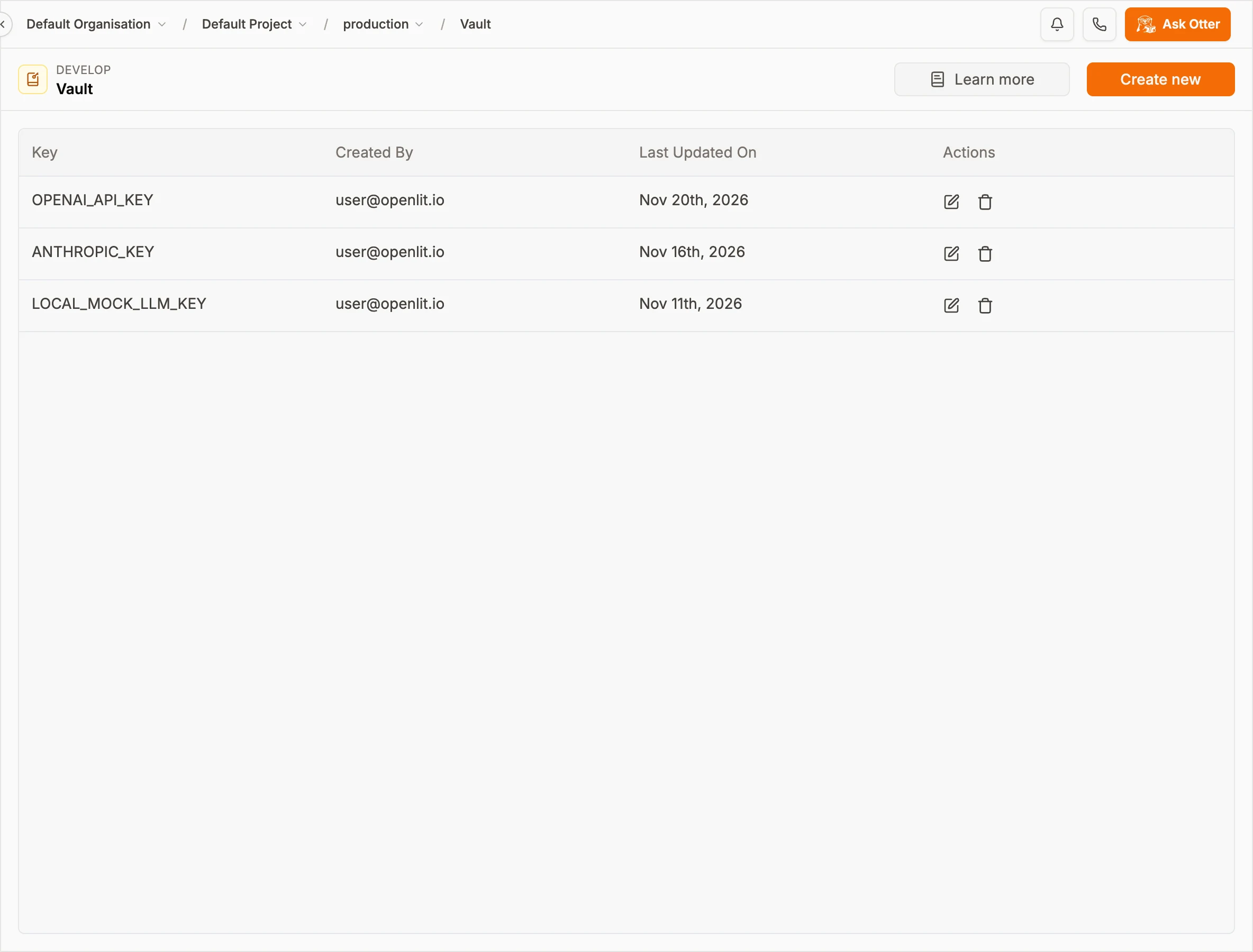
To rotate a key, edit it here. The app and the eval judge both read the new value.
Step 5: Verify it, in CI and in production
Until you measure it, a fix is a guess. I like to check on both sides of the deploy.
Before shipping, run offline evals in your tests using the same judge as production:
import openlit

def test_refund_window_is_not_hallucinated():
    result = openlit.eval(
        prompt="What's your refund policy?",
        response=run_support_agent("What's your refund policy?"),
        contexts=[REFUND_POLICY],
        eval_types=["hallucination"],
        print_results=False,
    )
    assert result.passed, f"Hallucination detected: {result.failed_evals}"
For a whole regression set, use openlit.eval_batch(dataset=...) and assert on result.pass_rate.
After shipping, watch the same numbers on real traffic. The default LLM dashboard shows requests, latency and cost next to hallucination, bias and toxicity counts, so a drop in quality is as easy to spot as a jump in latency:
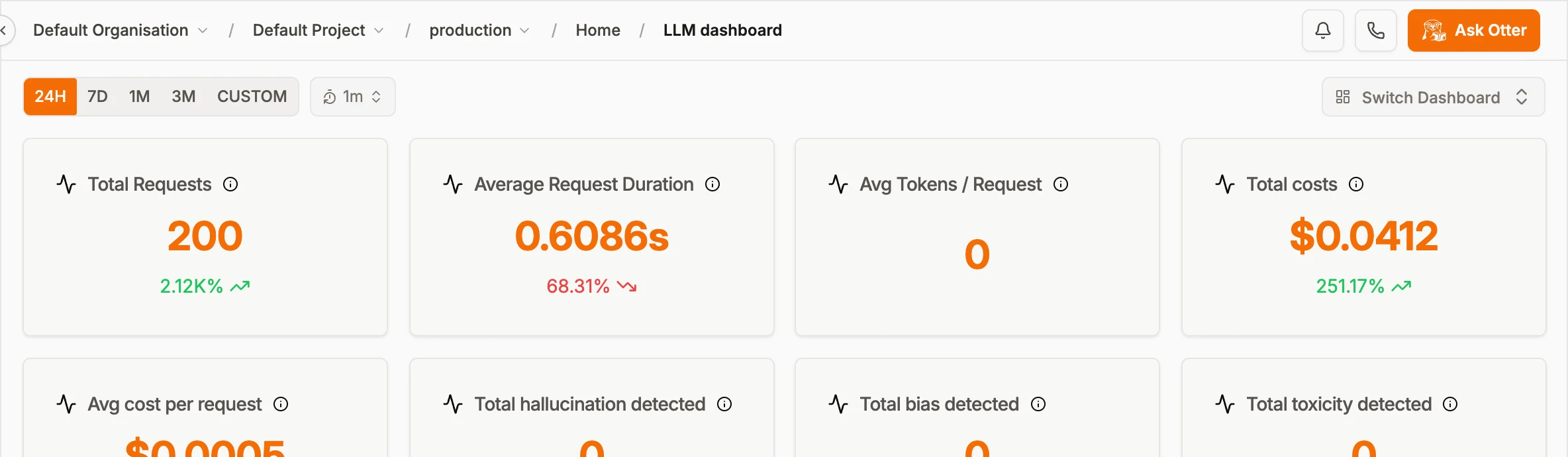
Quality and cost on one screen. If the hallucination count starts climbing, open the failing traces and go around again.
When something new breaks, you're back at Step 1: find it in a trace, score it, fix the harness, verify.
What you get out of it
The biggest change for me is how fast behavior fixes go out. Context and prompt edits are live on the next evaluate_rule() call, and rolling back means picking the previous prompt version.
The policy also stops living in four places. The agent reads it from the same Context the judge grades against, so the two can't disagree.
Quality becomes something you track. Pass rates and hallucination counts sit next to latency and cost, and the failing traces are a click away.
Keys stop showing up in images and .env files, because they're fetched from Vault at runtime.
And you aren't locked in. Traces are standard OpenTelemetry GenAI spans you can send anywhere, and because OpenLIT is self-hosted, your prompts, contexts and traces stay on your own infrastructure.
Do you need all of it?
Probably not on day one. A prototype with one prompt and one developer only needs Step 1. Add evaluations when real users show up, and the Rule Engine when you have more than one context or prompt to route between.
The full loop is worth it when your agent answers questions that cost money if they're wrong, like refunds, pricing, eligibility or anything compliance cares about. Context plus Hallucination evals is the place to start there. It also helps once more than one team edits prompts (versioning and rules make "who changed the prompt?" much easier to answer), when you run several models or environments that need different prompts or eval coverage, and when someone from security asks where your API keys live.
You'll need Docker for the local stack, the openlit SDK (Python, TypeScript or Go), and an LLM key for the judge if you turn on LLM-as-a-judge evaluations.
Wrapping up
Agents fail quietly, and a better model won't fix that on its own. What does help is a harness you can see, score, guard, change and verify, with all five steps working off the same data. In OpenLIT that's openlit.init() and @openlit.trace for tracing, LLM judges and Auto Evaluation for scoring, the SDK guards for inputs, Context, Prompt Hub, the Rule Engine and Vault for fixes, and openlit.eval() plus the dashboard for checking it held.
The easiest way to try it is docker compose up -d, point one agent at it, and go around the loop once. The Rule Engine, Context and Evaluations docs go deeper on each step. If you get stuck or something doesn't behave the way I described, open an issue on GitHub.

- Name
- Aman Agarwal
- GitHub
- @AmanAgarwal041