

- Published on
Rule Engine Explained: Run the Right Eval, Context and Prompt on the Right Trace

If you've shipped an LLM feature and kept it running for a few months, there's a good chance you have a function like this somewhere:
if env == "production" and model in ("gpt-4o", "gpt-4o-mini"):
    system = REFUND_POLICY + PROD_PROMPT
    if model == "gpt-4o-mini":
        system += CONCISE_STYLE
elif env == "staging":
    system = CANARY_PROMPT
...
It starts as three lines. Then it picks up a branch for every model you try, every environment, every policy tweak legal sends over. Eventually it also decides which evaluators run on which traffic, and changing one sentence of refund policy means a PR and a deploy.
The Rule Engine in OpenLIT exists to get that function out of your code. You write the conditions once, in the UI, against fields your traces already have. You attach the Contexts, Prompt Hub prompts and evaluators each rule should hand back. At runtime your app asks one question: what applies to this call?
I set up four rules for a demo support agent while writing this, and I poked at the matching logic with some deliberately bad inputs. A couple of the results surprised me, so they get their own section near the end. If you've read the harness engineering loop post, this is the longer version of its Step 4.
Why bother moving it out of code
The obvious win is that you can change what the agent gets without deploying. Swap the policy text for one model, or point staging at a new prompt, and the next call picks it up.
The less obvious one is that OpenLIT's own evaluations read the same rules. When a trace gets evaluated, the rules decide which judges run and which Context the judge uses as ground truth. So the policy your agent was given and the policy it gets graded against come from the same place. With the if ladder, those two drift apart the moment someone updates one and forgets the other.
It also helps with eval cost. LLM judges aren't free, and running every judge on every trace adds up. A rule lets you say "only run the expensive ones on the expensive runs."
The setup
The agent is the one from the hub post: traced with openlit.init(application_name="support-agent", environment="production"), calling gpt-4o and gpt-4o-mini. These are the four rules I ended up with:
| Rule | Matches when | Returns |
| Support agent in production | service support-agent AND env production AND model in gpt-4o-mini,gpt-4o | Refund Policy context, support-agent-system prompt, Hallucination eval |
| gpt-4o-mini answer style | model equals gpt-4o-mini | Concise answer style context |
| Expensive runs get deeper evals | total cost > 0.0004 OR output tokens > 150 | Completeness and Relevance evals |
| Staging canary prompt (inactive) | env staging AND service support-agent | support-agent-system-canary prompt |
What a rule is made of
A rule has a status (Active or Inactive), one or more condition groups, an operator that says how the groups combine (AND or OR), and the entities it returns when it matches. Inside a group, the conditions are joined by that group's own AND or OR. Inactive rules are never evaluated at all.
You'll find them under Develop, on the Rule Engine page:
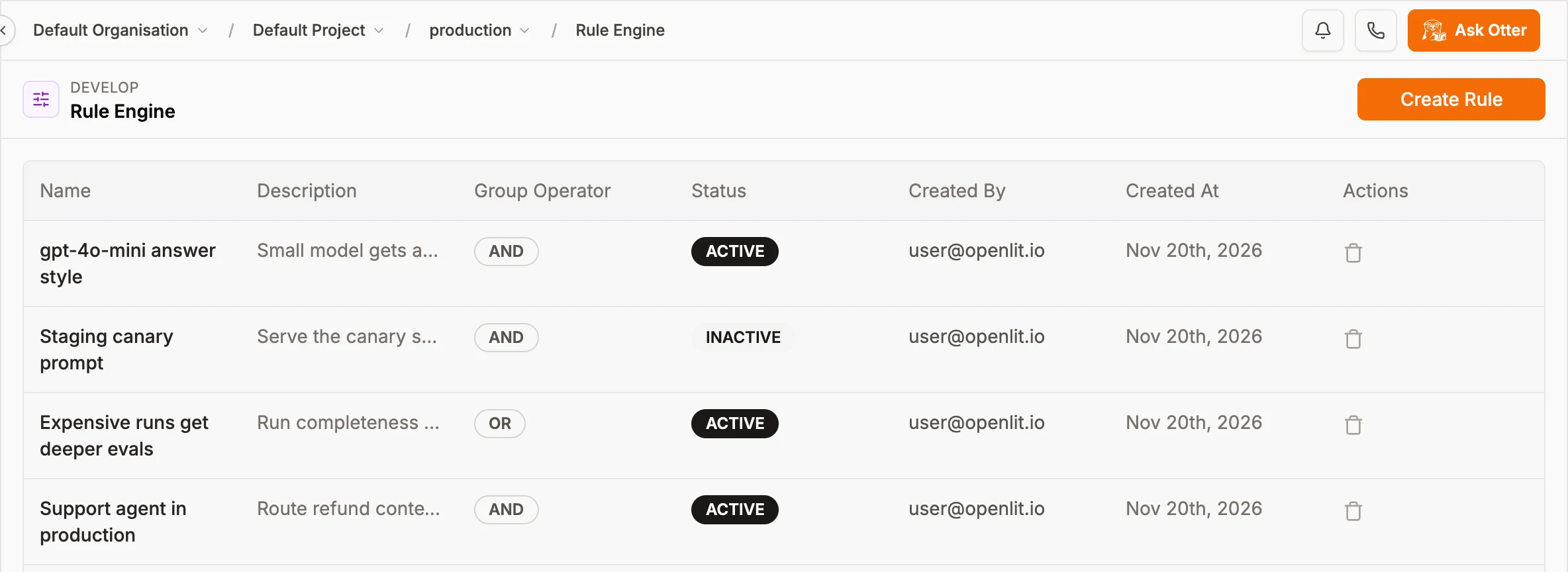
The four rules. The OR badge is on the one whose groups combine as "any group matches".
Create Rule only asks for a name, a description, the group operator and a status. Conditions and links get added on the rule's own page once it exists.
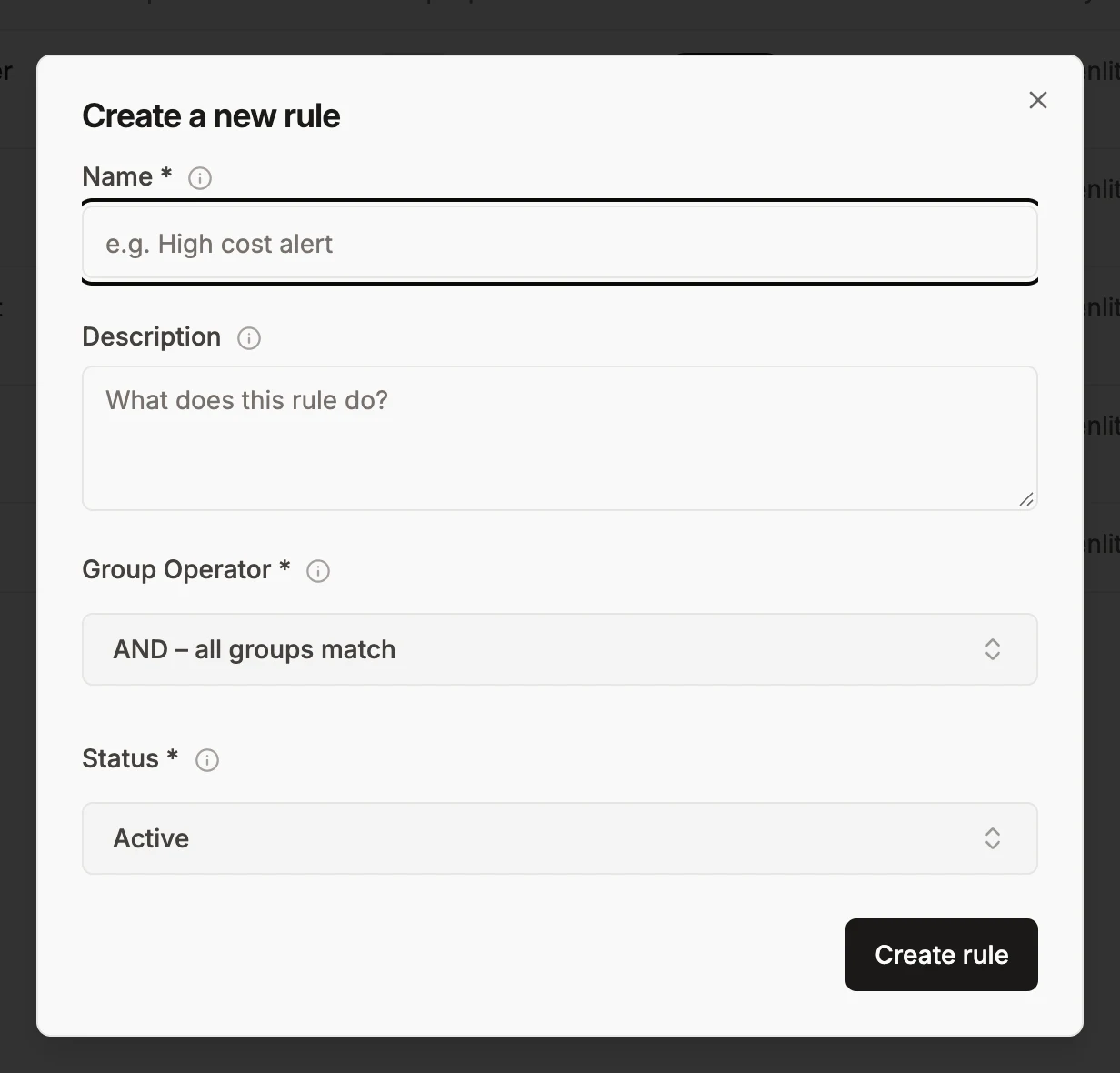
A new rule starts empty.
Conditions
You pick fields and operators from dropdowns, which means you can't typo a field name. The fields come from your telemetry: Service Name, Span Name, Span Kind, Duration (ms), Status Code, Deployment Env, Gen AI System, Model, Input Tokens, Output Tokens, Total Cost ($) and Temperature, plus tool-name and coding-agent fields in recent builds.
String fields get equals, not_equals, contains, not_contains, starts_with, ends_with, regex, in and not_in. Number fields get equals, not_equals, gt, gte, lt, lte and between (written as min,max). The value box suggests the 100 most common values from your traces, which turned out to be more useful than I expected, for reasons you'll see below.
The production rule is a single AND group with three conditions. It's linked to the Refund Policy context, the support-agent-system prompt and the Hallucination evaluator. Run Preview checks the saved conditions against your last 100 traces, so you can see what would match before anything calls it:
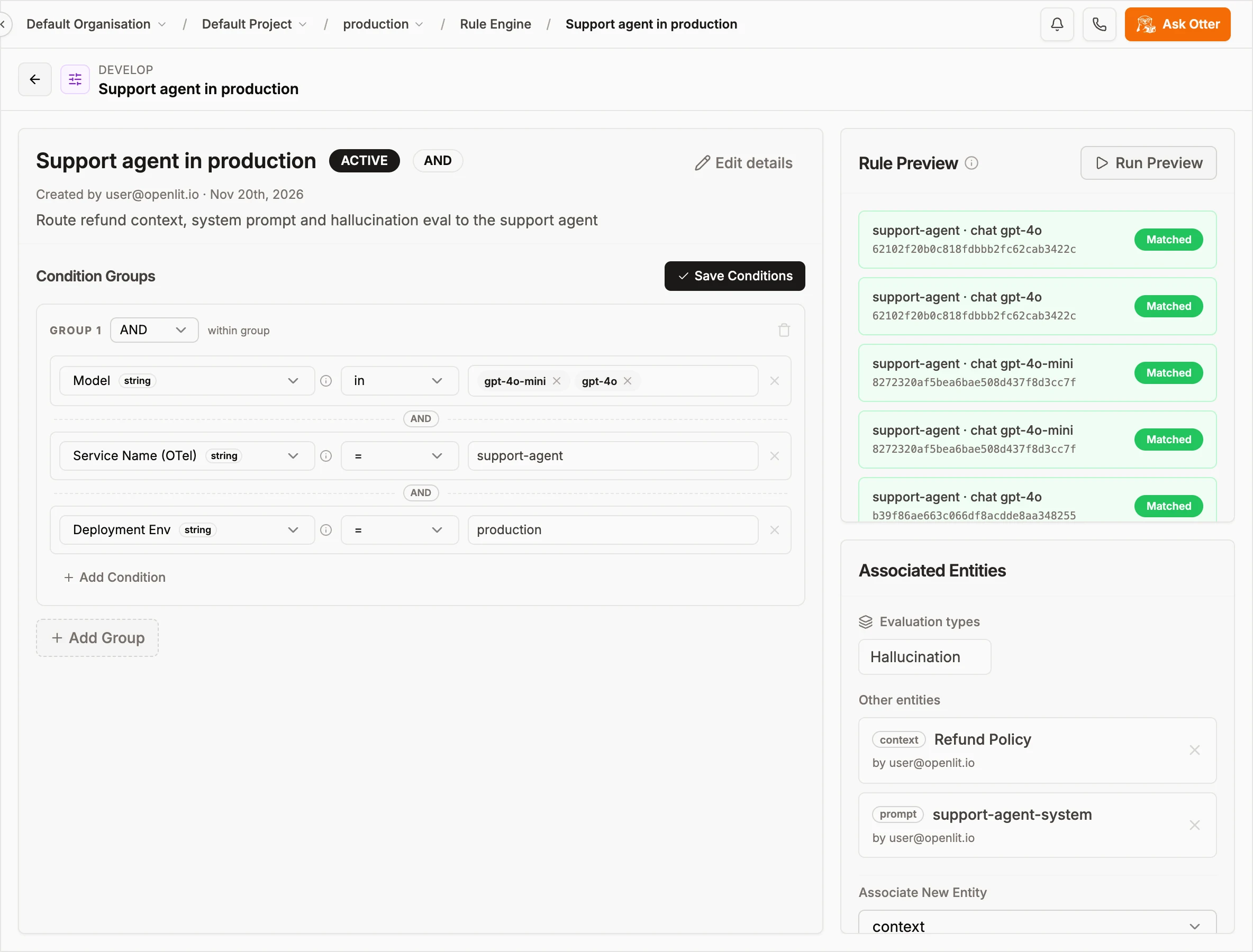
Every previewed trace matched, which is what I wanted before wiring it into the app.
OR groups
The expensive-runs rule is two groups with one condition each, joined by OR. A run qualifies if it cost more than $0.0004 or wrote more than 150 output tokens:
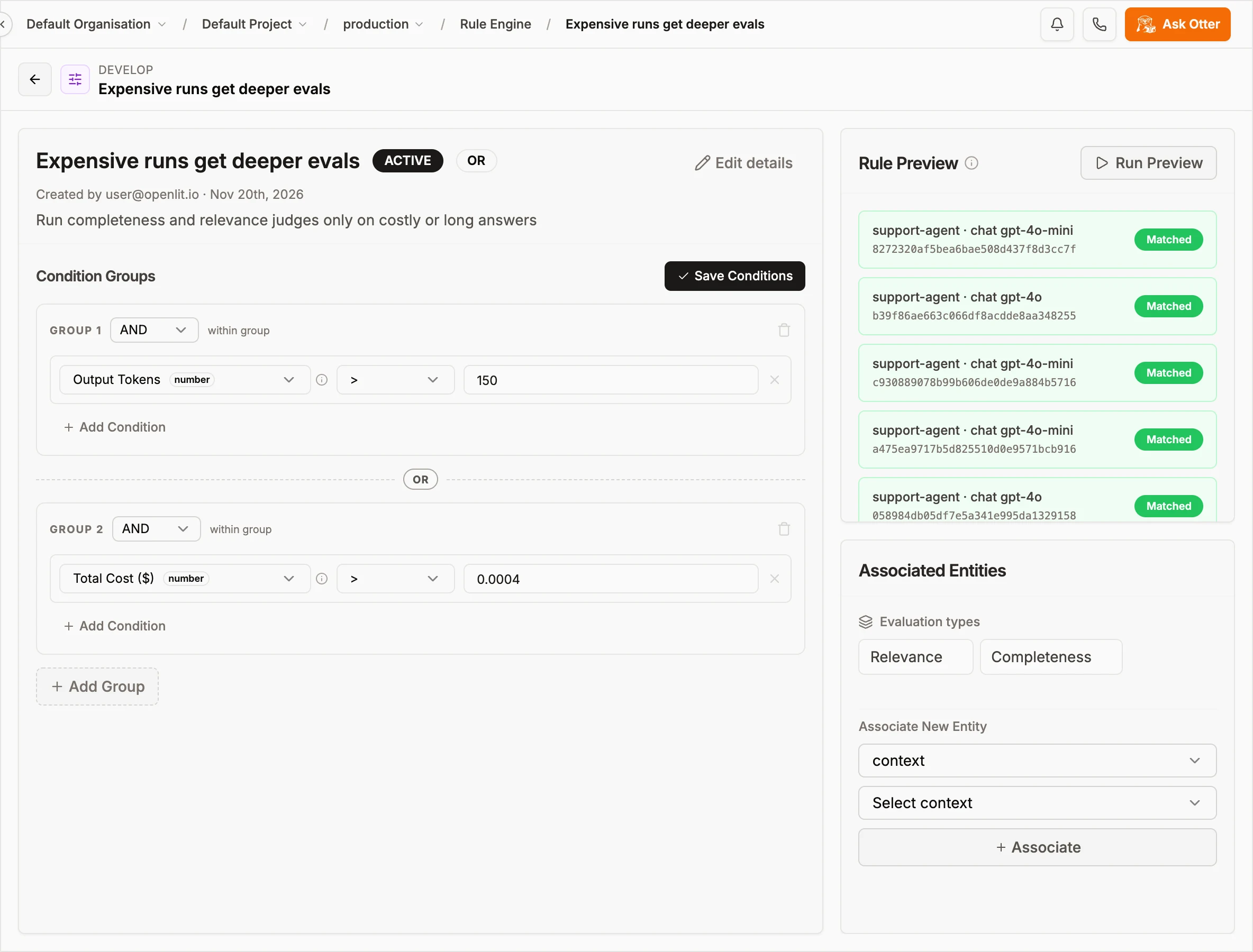
Relevance and Completeness only run on traffic that matches here, so I'm paying for them on a slice instead of everything.
If you need (A AND B) OR C, put A and B in one AND group, C in a second group, and set the rule's operator to OR.
Linking contexts, prompts and evaluators
You can link from either end. On a rule, pick a type under Associated Entities and hit Associate. On a Context or Prompt page there's a Rules panel showing which rules return it, and New Rule there creates one that's already linked:
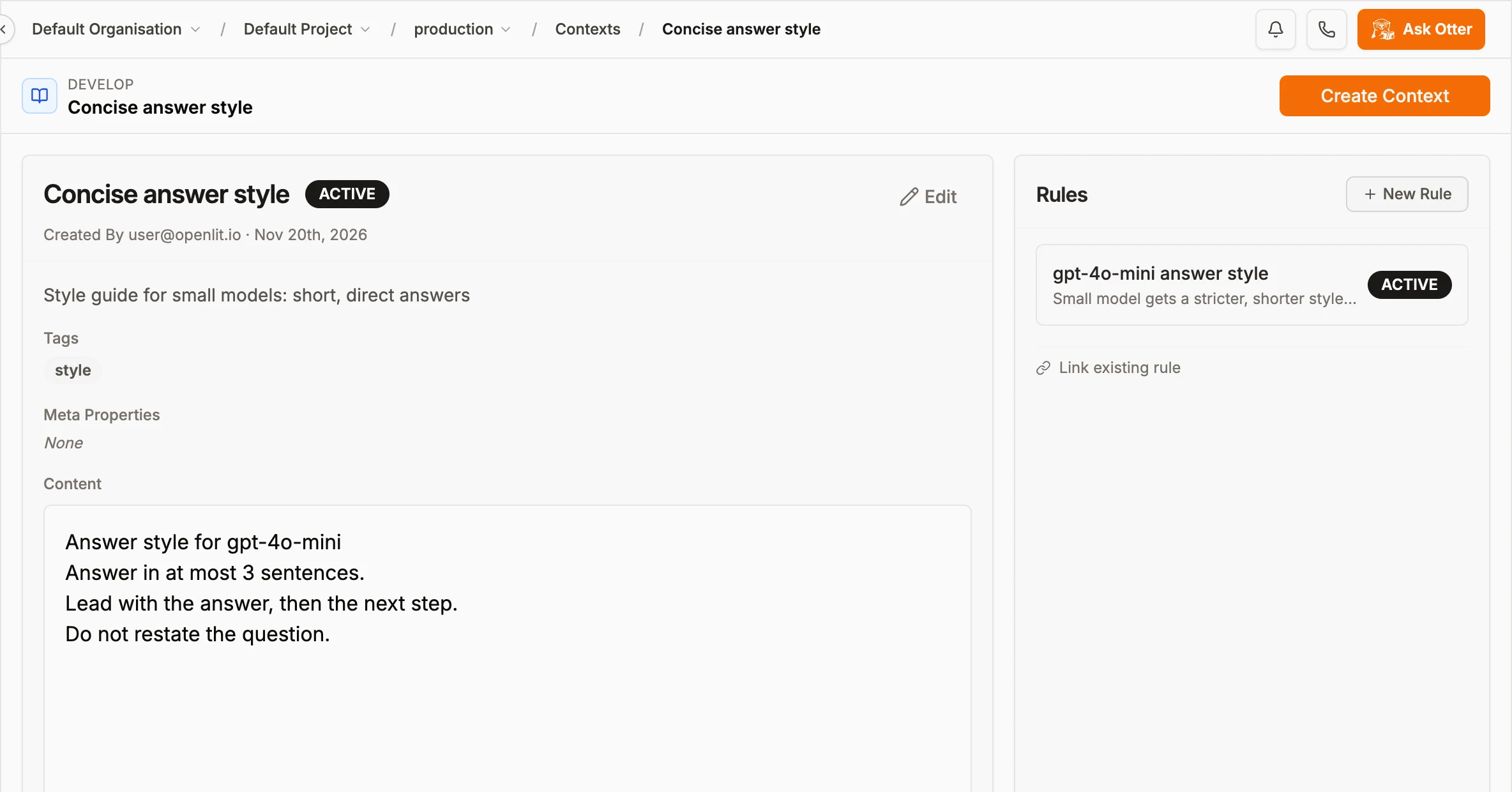
Handy when someone asks "when does this text actually get used?"
Evaluators show the link as well. On the Evaluators tab under Evaluations, any type linked to a rule has a Rule engine badge and a "Linked from rules" line:
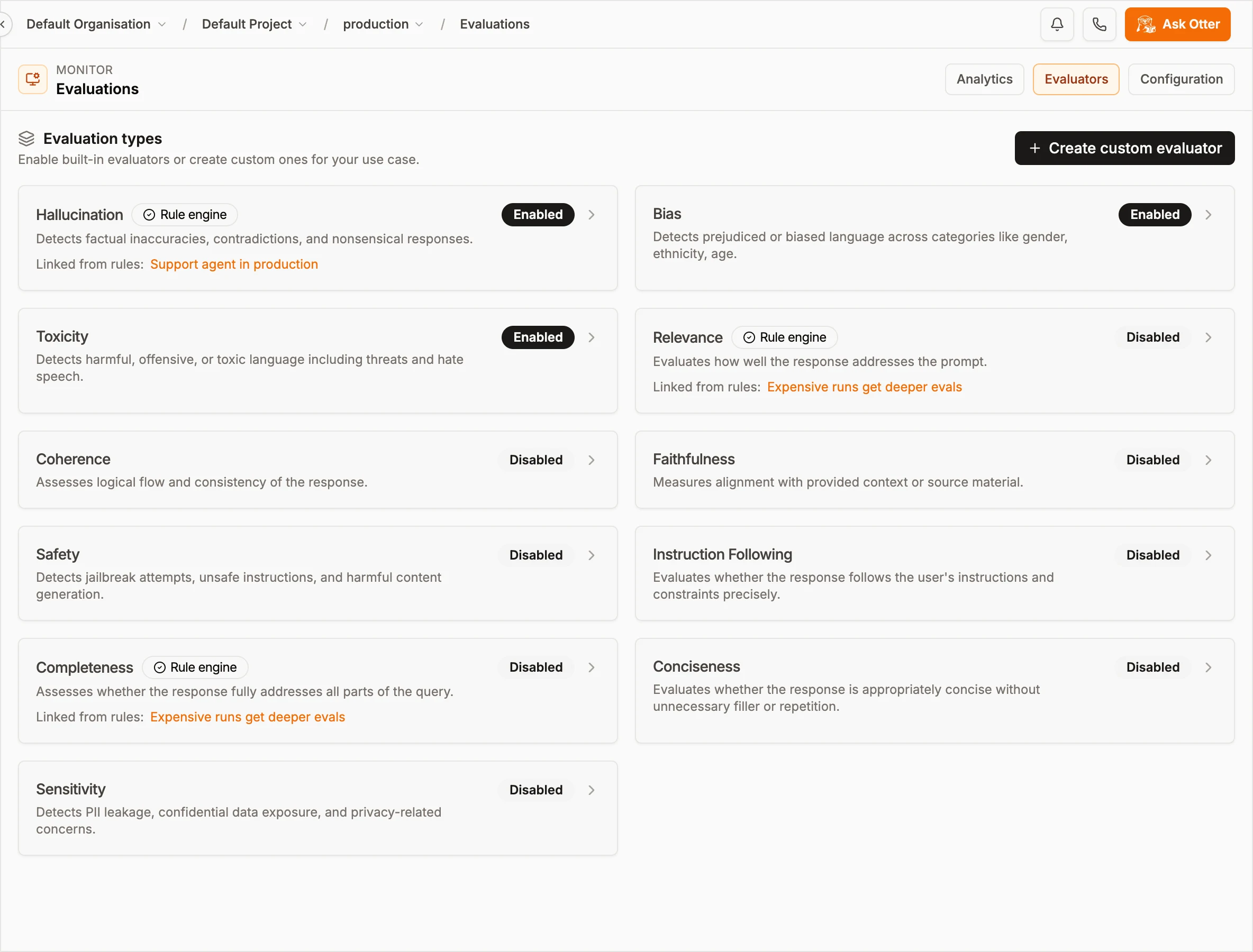
Hallucination runs on production support traffic. Relevance and Completeness only on expensive runs.
When OpenLIT evaluates a trace, either manually or through Auto Evaluation, it takes that trace's attributes, runs them through the rules, and passes whatever Contexts match to the judge as ground truth.
Inactive rules
Status works as an off switch. The canary rule is fully set up but Inactive, so it won't match even on staging traffic. When I want to try the canary prompt, I flip it on. If it goes badly, I flip it off again.
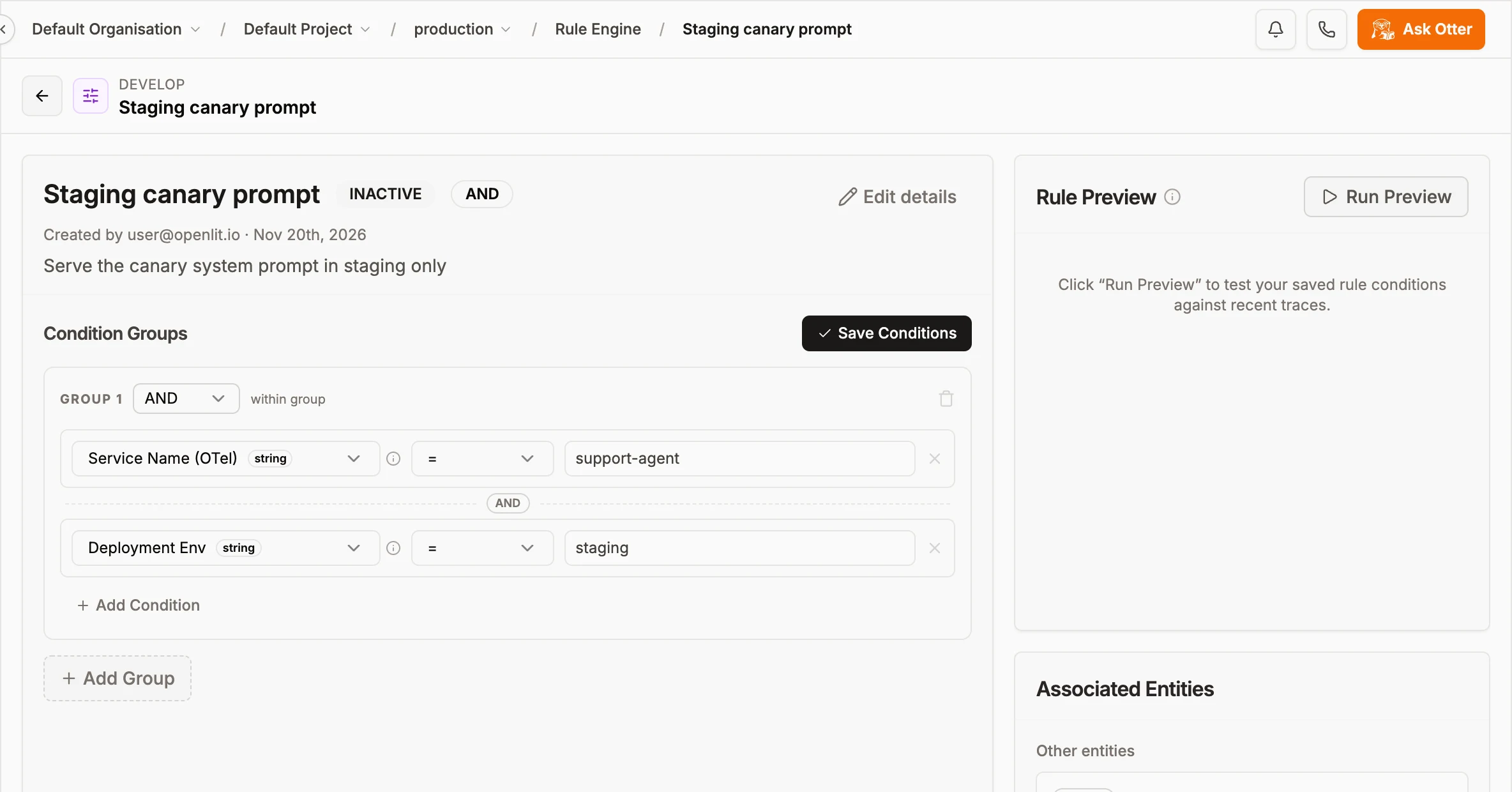
Configured, but skipped until someone turns it on.
Calling it from your app
You'll need an API key from Settings > API Keys. The evaluate endpoint takes it as a Bearer token, so there's no dashboard login involved.
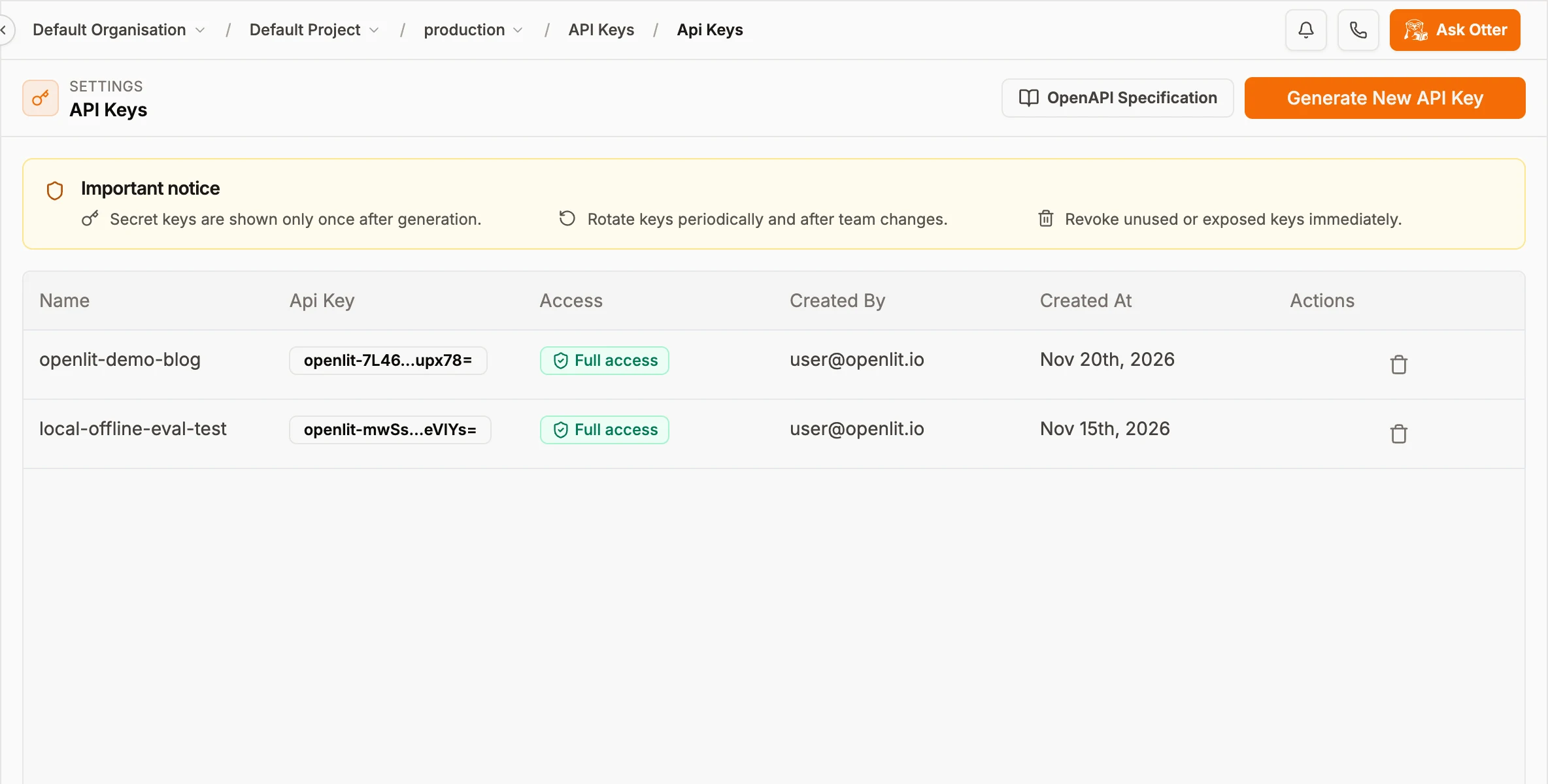
The key is shown once when you create it and masked after that. On Enterprise you can scope a key to rule_engine only.
With curl:
curl -X POST "$OPENLIT_URL/api/rule-engine/evaluate" \
  -H "Authorization: Bearer $OPENLIT_API_KEY" \
  -H "Content-Type: application/json" \
  -d '{
    "entity_type": "context",
    "fields": {
      "service.name": "support-agent",
      "deployment.environment": "production",
      "gen_ai.request.model": "gpt-4o-mini"
    }
  }'
This is what my instance returned. Both the production rule and the mini-model style rule matched, so I got two contexts back:
{
  "matchingRuleIds": ["2fa29ac3-...", "410c6dfa-..."],
  "entities": [
    { "rule_id": "2fa29ac3-...", "entity_type": "context", "entity_id": "0fbec376-..." },
    { "rule_id": "410c6dfa-...", "entity_type": "context", "entity_id": "e48b3d14-..." }
  ]
}
Pass "include_entity_data": true and you get the full records too (the context content, the prompt text), keyed by "{entity_type}:{entity_id}". In Python, that if ladder from the top of the post turns into this:
import openlit

def build_system_prompt(model: str, env: str) -> str:
    fields = {
        "service.name": "support-agent",
        "deployment.environment": env,
        "gen_ai.request.model": model,
    }
    prompt = openlit.evaluate_rule(
        entity_type="prompt",
        fields=fields,
        include_entity_data=True,
        entity_inputs={"variables": {"company": "Acme", "refund_days": "30"}, "shouldCompile": True},
    )
    ctx = openlit.evaluate_rule(entity_type="context", fields=fields, include_entity_data=True)

    parts = [d.get("compiledPrompt") or d.get("prompt") for d in (prompt or {}).get("entity_data", {}).values()]
    parts += [d["content"] for d in (ctx or {}).get("entity_data", {}).values()]
    return "\n\n".join(p for p in parts if p)
openlit.evaluate_rule picks up OPENLIT_URL and OPENLIT_API_KEY from the environment. The TypeScript (Openlit.evaluateRule) and Go (openlit.EvaluateRule) versions look the same. The SDK Rule Engine reference has the details.
Four things I found by breaking it
Once the rules were working, I sent the evaluate endpoint some inputs I knew were wrong, just to see what happened. Here's what's worth knowing before you depend on it.
If you leave a field out, conditions on it are skipped. I sent only {"gen_ai.request.model": "gpt-4o"}, with no service or environment. The production rule still matched, even though two of its three conditions had nothing to check against. I'd assumed a missing field would fail the condition. It doesn't, so send every field your rules use, every time. Building fields in one helper, like build_system_prompt above, makes that easy to stick to. (We're discussing whether this should fail closed instead, which seems like the safer default to me.)
Matching is exact and case-sensitive. GPT-4o-mini matched nothing. This is where the value suggestions in the condition builder earn their keep: they show the exact strings your traces contain.
in lists don't trim spaces. The list is split on commas and that's it. Write gpt-4o-mini,gpt-4o. If you put a space after the comma, the second value becomes gpt-4o with a leading space, and it will never match.
Overlapping rules all come back. Production gpt-4o-mini traffic matched two rules and got two contexts. Here that's what I wanted, policy plus style. But nothing picks a winner for you, so if two rules return different prompts, your code has to decide. My approach: keep prompt rules from overlapping, and let context rules stack.
One smaller thing: number fields treat anything non-numeric as 0. A total cost of "n/a" becomes 0, so it won't trip a > 0.0004 rule.
When it's worth it
If you have one prompt, one model and one environment, you don't need this yet. Fetching the prompt from Prompt Hub by name is plenty.
It starts paying off when you serve more than one model or environment and they need different instructions, or when the facts in your prompts (pricing, refund windows, compliance wording) change more often than your code does. It's also the cleanest way I know to stop eval spend from creeping up, and it gives other people on the team one page to look at instead of a function to read.
A decent rule of thumb: the day you write your first if model == ... branch, write a rule instead.
To follow along you need OpenLIT running (docker compose up -d), some traces flowing so the suggestions and preview have data, and an API key.
Wrapping up
That's the Rule Engine: conditions on trace fields, linked to the Contexts, Prompts and evaluators that should apply, with a preview button and an on/off switch. The routing that used to live in an if ladder ends up on a page you can read, and the same rules drive what your agent sees and what it's graded on.
If you only keep one thing from this post, make it the missing-fields behavior. Send all your fields.
For the bigger picture, read the harness engineering loop. For more on the eval side, there's how to detect hallucinations in your RAG pipeline. Every field and operator is in the Rule Engine docs, and if you hit something odd, open an issue on GitHub. I'd like to hear about it.

- Name
- Aman Agarwal
- GitHub
- @AmanAgarwal041