

- Published on
Fleet Hub Playbook for Multi-Region AI Observability
Introduction
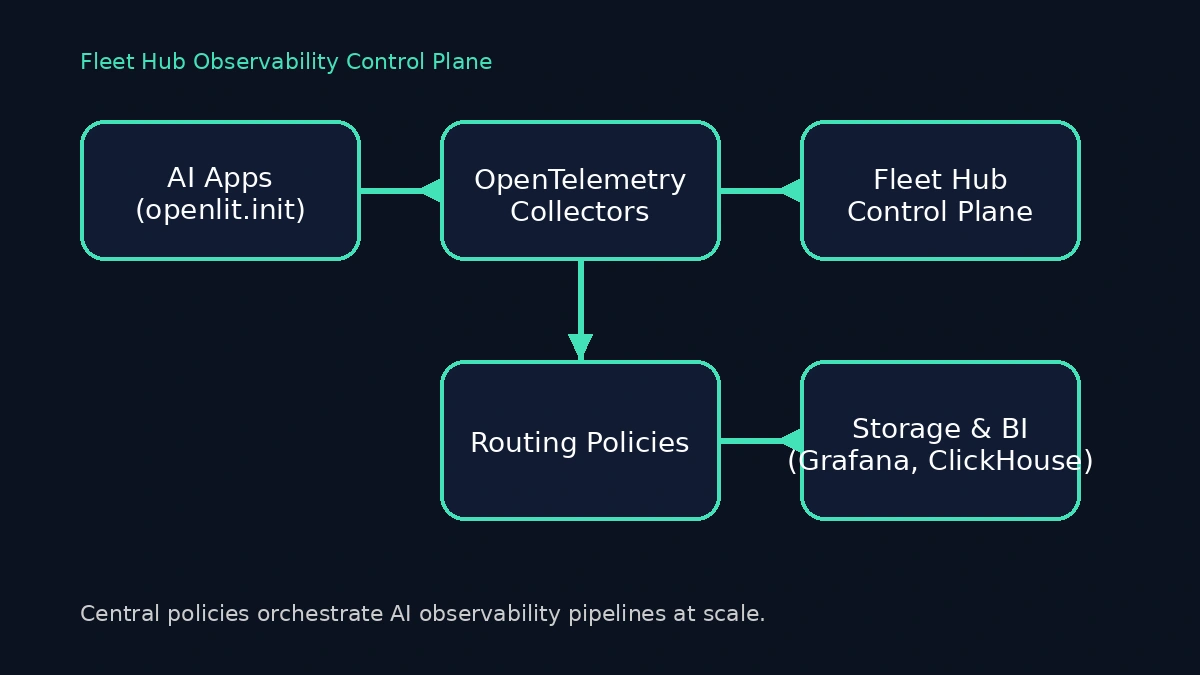
Multi-model AI platforms rarely run in one place. You juggle GPU schedulers for inference, CPU-heavy retrieval augmentation pipelines, and dozens of fine-tuned assistants built by different teams. Each team deploys its own OpenTelemetry Collector with custom processors, and the slightest misconfiguration leaves blind spots that slow incident response. Fleet Hub, OpenLIT's centralized management system for OpenTelemetry collectors, gives you a single view of every collector, policy, and pipeline your AI estate depends on. Combined with the one-line openlit.init() instrumentation across Python services, it changes the day-to-day rhythm of operating generative AI systems.
This playbook covers how Fleet Hub works, what changes for platform reliability engineers, and the exact steps to connect collectors using the OpAMP supervisor. You will walk through upgrading to the Fleet Hub-enabled release, configuring the supervisor correctly, and using the dashboard to manage your collector fleet.
Why It's Important
Operating production LLM platforms is no longer about a single inference API. Observability leads have to reconcile:
Regionalized collectors for latency-sensitive GPU clusters, each tuned differently.
RAG pipelines that fan out across vector databases, embedding providers, and orchestrators like LangChain or LlamaIndex.
Vendor diversity: OpenAI, Anthropic, Azure OpenAI, Groq, Vertex AI, Mistral and in-house LLMs deployed on Kubernetes.
Compliance guardrails that demand deterministic routing of telemetry events and retention policies.
Without Fleet Hub, coordination becomes a spreadsheet exercise—manual GitOps diffs and Slack pings to confirm a collector was patched or scaled. Fleet Hub turns that chaos into a map. It inventories every collector, tags its health and configuration, and lets you push configuration updates across the fleet from a single UI. When coupled with OpenLIT's automatic instrumentation, you get a clear contract: engineers call openlit.init(), and the platform team guarantees consistent traces, metrics, and logs no matter how many collectors sit between workloads and downstream sinks.
Upgrade Notice
Fleet Hub arrived in OpenLIT 1.15.0. Several things changed in that release that require attention before you connect collectors:
Docker Compose deployments must use
--remove-orphanswhen restarting. The OpenTelemetry Collector has been integrated directly into the OpenLIT container. The legacy standaloneotel-collectorcontainer is no longer needed, and leaving it running causes port conflicts on 4317 and 4318.The OpAMP server now runs inside the OpenLIT container. After upgrading, navigate to Fleet Hub in the UI to confirm the integrated collector is running and reporting health status.
Configuration flows through Fleet Hub. Existing external collectors can now be connected to the new OpAMP endpoint so that processors, exporters, and sampling rules stay synchronized centrally.
How to Implement It
1. Prerequisites: Automatic Instrumentation Everywhere
Fleet Hub manages your collector fleet, but it assumes workloads are already emitting OpenTelemetry signals. OpenLIT's Python SDK handles the heavy lifting. Your only code change is a single init call at service startup:
import os
from openlit import init as openlit_init

os.environ.setdefault("OPENLIT_API_KEY", "<your-api-key>")
os.environ.setdefault("OPENLIT_SERVICE_NAME", "agent-orchestrator")
os.environ.setdefault("OPENLIT_ENVIRONMENT", "production")

openlit_init()
The service name and environment propagate through traces, spans, and metrics automatically. OpenLIT provisions trace providers, metric readers, and log emitters for 60+ supported LLMs, frameworks, vector databases, and GPU runtimes—no manual wrappers or exporter code required.
2. Upgrade the Platform to Fleet Hub
Fleet Hub ships with OpenLIT 1.15.0 and later. If you are running Docker Compose, follow the migration steps exactly:
# Stop the current deployment
docker-compose down

# Pull the latest 1.15.0+ images
docker-compose pull

# Restart, removing the legacy standalone collector container
docker-compose up -d --remove-orphans
The --remove-orphans flag is critical. Without it, the old otel-collector container remains running and conflicts with the integrated collector now bundled inside the OpenLIT container, causing startup failures on ports 4317 and 4318.
After the upgrade, open Fleet Hub in the OpenLIT UI and confirm the integrated collector is listed and reporting a healthy status before you proceed.
3. Configure OpAMP Supervisors for Each Collector
Fleet Hub communicates with collectors through the OpAMP (Open Agent Management Protocol). On every host where an OpenTelemetry Collector runs, you need an OpAMP supervisor that points at your OpenLIT instance.
Create a supervisor.yaml with the correct structure:
server:
  # Replace with your OpenLIT instance URL
  endpoint: wss://your-openlit-instance:4320/v1/opamp
  tls:
    insecure_skip_verify: false # Set to true for development only

agent:
  # Path to your OpenTelemetry Collector binary
  executable: /usr/local/bin/otelcol-contrib

  # Configuration files for the collector
  config_files:
    - /etc/otel/otel-collector-config.yaml

capabilities:
  accepts_remote_config: true
  reports_effective_config: true
  reports_own_metrics: false
  reports_own_logs: true
  reports_own_traces: false
  reports_health: true
  reports_remote_config: true

storage:
  directory: ./storage
Key points worth calling out:
config_files(notargs) is the correct field for specifying which collector configuration the supervisor manages./usr/local/bin/otelcol-contribis the standard install path for the OpenTelemetry Collector Contrib distribution. Adjust this to match your environment.capabilitiestells the OpAMP server which features this supervisor supports—remote config acceptance and health reporting are the most important for Fleet Hub.storage.directoryis where the supervisor persists state between restarts.
Download and start the supervisor:
# Download the OpAMP supervisor binary
curl -LO https://github.com/open-telemetry/opentelemetry-collector-releases/releases/latest/download/opampsupervisor_linux_amd64

# Make it executable
chmod +x opampsupervisor_linux_amd64

# Start with your configuration
./opampsupervisor_linux_amd64 --config supervisor.yaml
As soon as the supervisor connects, the collector appears in Fleet Hub with health status, version, and platform metadata. Use naming conventions or tags to group collectors by purpose—GPU inference, RAG retrieval, or experimentation sandboxes—so you can filter and apply updates with confidence.
4. Monitor and Manage Fleets from the Dashboard
Once collectors are connected, the Fleet Hub dashboard gives you:
Real-time monitoring – Live health summaries capture heartbeat status, resource usage, and uptime for every collector so you can spot regressions before traces disappear.
Configuration management – Push updates to processors, exporters, and sampling rules centrally. Select a collector, edit the YAML in the configuration editor, and click Save to deploy changes through OpAMP. Monitor the Effective Configuration tab to confirm changes were applied.
Comprehensive inventory – Filter by OS, architecture, version, or name to understand exactly which collectors serve which traffic lanes.
Component-level health – Each collector reports the status of individual receivers, processors, and exporters. When a specific component fails, Fleet Hub surfaces the error message directly in the dashboard.
Note: Configuration changes are applied immediately through the OpAMP channel. Always validate your YAML syntax before saving to avoid collector disruption. Fleet Hub shows the effective (running) configuration alongside the custom configuration you push, so mismatches are easy to spot.
5. Validate End-to-End
Instrumentation only counts when spans arrive with the right context. After connecting collectors to Fleet Hub, validate the full pipeline:
Trigger a request against your LLM service so OpenLIT emits traces, metrics, and logs automatically.
In Fleet Hub, confirm the relevant collectors show a healthy heartbeat and that the latest configuration has been applied—any drift or parsing errors surface immediately.
Open OpenLIT's Requests view (or your downstream Grafana/Tempo workspace) and check for attributes like
gen_ai.system,gen_ai.request.model, andgen_ai.usage.input_tokens. These are emitted out of the box for supported providers including OpenAI, Anthropic, Mistral, Groq, Hugging Face, and Amazon Bedrock.If signals are missing, inspect supervisor logs, validate TLS configuration, and verify the collector can reach the OpAMP endpoint on port 4320:
telnet your-openlit-instance 4320
This loop gives you confidence that both automatic instrumentation and fleet-level governance are functioning before you roll the changes across every region.
Benefits and Outcomes
Fleet Hub delivers measurable operational advantages:
Unified change control – A single audit trail for collector updates replaces ad-hoc config file changes or SSH sessions. You can see the effective configuration every collector is running at any time.
Faster remediation loops – Component-level health monitoring surfaces exact error messages, so you know whether a pipeline stall is a receiver failure, an exporter timeout, or a configuration parsing error—without digging through distributed logs.
Cost governance – Centralized configuration lets you manage volume by adjusting sampling rules or swapping exporters across the entire fleet with a few edits, without redeploying any application code.
Provider-aware insights – Because OpenLIT automatically captures
gen_ai.*attributes for OpenAI, Anthropic, Vertex AI, Groq, Cohere, Ollama, Hugging Face, Amazon Bedrock, and more, you get per-provider cost and latency visibility without extra modeling.Security and compliance – Central policies guarantee sensitive prompts and embeddings are redacted, hashed, or dropped before leaving controlled collectors. One configuration update propagates instantly to every node in the fleet.
When to Use Fleet Hub
Consider Fleet Hub essential when:
You operate more than three collectors across regions or cloud providers and need a canonical inventory of what's running where.
You support mixed workloads—GPU inference, vector retrieval, streaming responses—and need differentiated pipeline policies per lane.
You have at least one regulated environment (finance, healthcare, education) and must prove prompt redaction or data retention rules are applied consistently.
You orchestrate multi-team or partner-built agents, where enforcement through pull requests alone risks configuration drift.
You plan to adopt signal-specific backends (Tempo, ClickHouse, BigQuery, New Relic, Datadog) and need dynamic routing without redeploying services.
Smaller teams can still benefit, but Fleet Hub shines once AI infrastructure becomes federated. It keeps the control plane thin while letting individual squads move fast.
Conclusion
Fleet Hub redefines how AI platform teams manage observability at scale. By pairing it with automatic OpenLIT instrumentation (openlit.init() everywhere), you gain precise control over telemetry routing, cost, and compliance without burdening application engineers.
Start by upgrading to OpenLIT 1.15.0 with --remove-orphans, then connect your first collector using the OpAMP supervisor. Once the collector appears in Fleet Hub with a healthy status, begin iterating: apply redaction policies, tune sampling rules, and extend governance to new teams as they onboard.

- Name
- Aman Agarwal
- GitHub
- @AmanAgarwal041